How to Create a Receipt (With a Real Example)
You need a receipt when the money has already landed: the payer wants proof, and you want your record to match the bank statement. Create it after the payment clears, not when you send the request. Most receipts fail on timing or on detail, not on design.
Disclosure: we build PaintPDF, and the example below is a real render of the receipt layout in our generator.
What a receipt has to prove
A receipt answers five questions on one page: who paid, who was paid, how much, when, and what for. The payer keeps it as proof. You keep a copy so the payment can be matched to an invoice, a month of rent, or a project.
The mistake that ruins a receipt is issuing it before the payment clears. A receipt says money arrived. If a transfer is reversed or a card payment is disputed, you have signed a page that says otherwise. Check your bank or payment processor first, then write the receipt.
The fields a receipt needs
You do not need every row for a cash sale at a market stall. You do need the payer, the amount, the date and what the money was for. The rest is what makes the receipt useful months later, when nobody remembers the transaction.
How to create a receipt, step by step
- Confirm the payment cleared. Open your bank or processor and note the date, the method and the reference. Do not work from a promise or a screenshot.
- Collect the payer's details. Use the name on the payment. Add an email or address only if the payer needs it on their copy.
- List what the payment covers. One line per item or period, each with its own amount. "March rent, $1,850" is easier to match than "rent".
- Add the totals. Subtotal, amount due, amount received and balance due. If the payment is partial, the balance stays visible: $1,970 due minus $1,000 received leaves $970.
- Give it a number and keep the sequence. RCPT-1042 follows RCPT-1041. Do not reuse a number after a voided receipt; issue the next one.
- Render the page and check it. The receipt generator builds an A4 page from those details. Check the payer name, the amounts and the date against your records, change anything by chatting with it, then download the PDF.
- Send one copy and file the other. Send the PDF to the payer and keep it with the invoice or lease it answers.
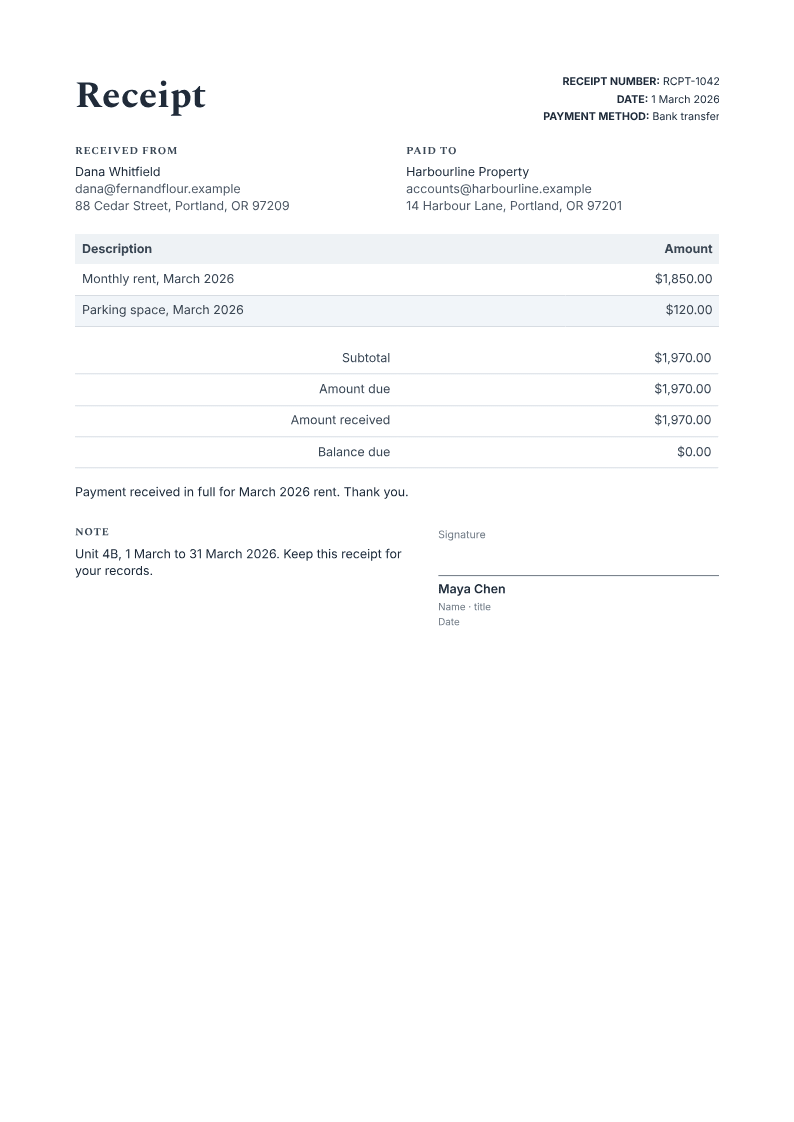
The example above is a rent receipt: Dana Whitfield paid Harbourline Property $1,970 on 1 March 2026 by bank transfer. The table splits the payment into $1,850 for March rent and $120 for the parking space. The totals repeat the same figure three ways: amount due, amount received, balance due. The balance is $0.00, which is the line that says the payment is settled.
For a partial payment, the same layout carries the outstanding amount. If Dana had paid $1,000, the amount due would still read $1,970, the amount received would read $1,000, and the balance due would read $970. The payer gets a receipt for what arrived, and neither side has to reconstruct the difference later.
The mistakes that make a receipt useless
- Issuing it too early. A receipt for money that has not cleared is a promise with a receipt number.
- Leaving out what the payment covered. "Payment received, $1,970" cannot be matched to a lease, an invoice or a tax period.
- Letting the totals disagree. The amount received plus the balance due has to equal the amount due. Check it before you send.
- Reusing a number. Two receipts with the same number create a question you will have to answer.
- Rewriting the invoice. Keep the invoice as the request for payment and issue the receipt against it. Editing the invoice destroys the record of what was asked for.
- Presenting it as an official or tax document. It records a payment between two parties. It is not a tax form and it does not replace your books.
Receipt, invoice or statement
The three documents do different jobs, and sending the wrong one creates a follow-up email:
- An invoice asks for money and sets a due date. Use the invoice generator when the work is done and the payment has not arrived.
- A receipt confirms that money arrived. It comes after the payment, not instead of the invoice.
- A statement lists a run of transactions over a period, usually for an account with several invoices.
If you are still at the asking stage, the guide to creating an invoice with AI walks through the fields and the layout. Once the payment lands, issue the receipt against that invoice and keep the two references aligned.
What this receipt is not
It is not proof that funds cleared: you confirm that in your own bank or processor account before you issue it. It is not a bookkeeping system, a tax document, or a substitute for your accounts. It is not an e-signature service; a printed signature line is a line on a page, not a verified signature. And it does not add form fields to a PDF you already have: the generator fills its own receipt layout, so an existing PDF stays a reference rather than becoming a fillable form.
Frequently asked questions
What should a receipt include?
The payer and payee, the date, the payment method, a description of what was paid for, the amount received, and a receipt number. Add a balance due line when the payment is partial, and a note when the payment covers a period.
Can I create a receipt for a payment I have not received?
No. A receipt records money that has already arrived. Use an invoice to ask for the payment, and issue the receipt only after it clears in your account.
Does a receipt need a signature?
A signature line is optional. It names the person who accepted the payment and gives the payer something to keep with the document. It is not an e-signature and it does not verify identity.
Can I reuse the same receipt every month?
Yes. Save the layout as a template, then change the date, the period and the amount for the next payment. Clear the previous payer's details before you send the new copy.
Is the receipt generator free?
The free plan gives you 100 credits, one time, which is about 40 simple documents. Exports have no watermark, and you do not need a card to start. Paid plans add more credits: Starter is $5 a month for 400, Pro is $15 a month for 1,200.
Enter who paid, how much and what for, then download a print-ready A4 receipt. Free to start, no watermark.
Fill my receipt