Receipt templates
Free Receipt Maker
Fill in who paid, how much, when and what for. The receipt renders as a real A4 PDF you can download, print, or keep as a template for the next payment.
Fill and download without an account. Use AI chat in the studio when you need more.
- Real document blocks
- Tables and headings stay selectable and printable.
- Live A4 preview
- What you see is what the PDF prints.
- Edit by chatting
- Change anything with one sentence.
- Free download
- No watermark, unlimited exports.
What is PaintPDF's receipt generator?
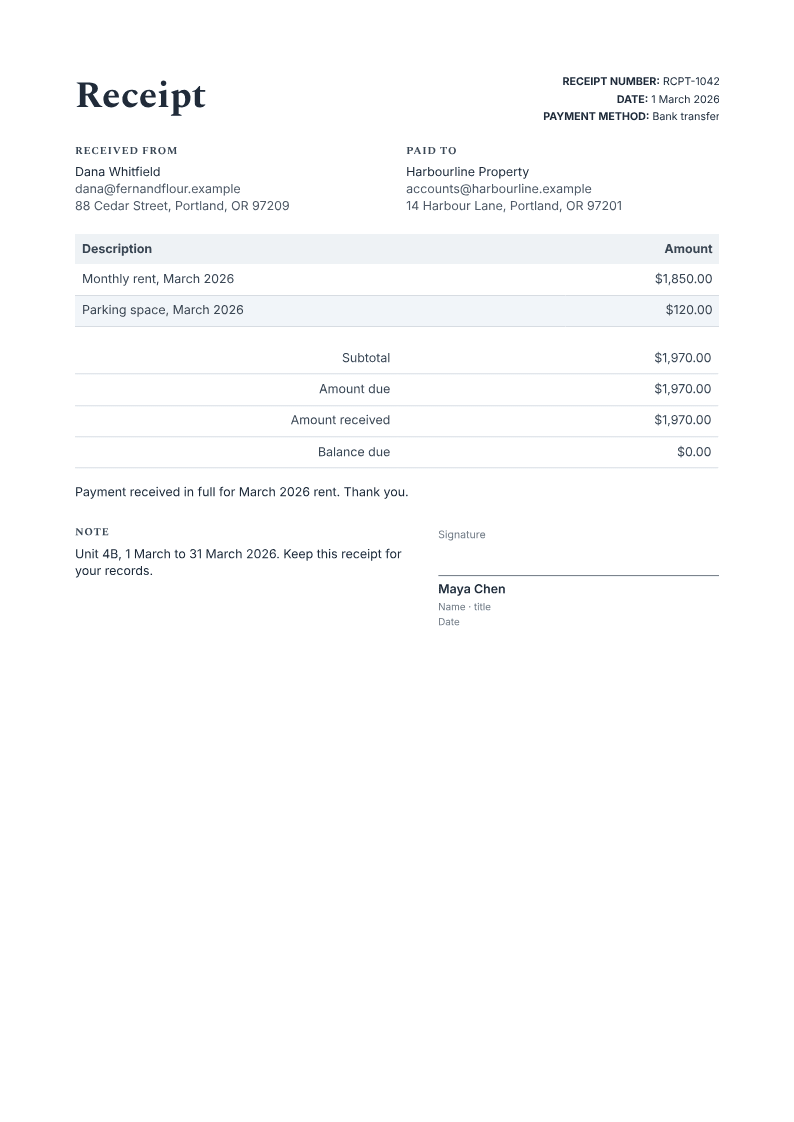
PaintPDF's receipt maker turns payment details into a printable A4 receipt: payer and payee, date, method, item lines, the amount received and any balance due. Fill the form, download the PDF, and reuse the saved template for the next payment. Free, no watermark.
Get a free receipt template: fill the form or pick an example in the live demo, then download the PDF or open it in the studio to make it yours. No sign-in to download, no watermark.
What a receipt has to show
A receipt is proof that money changed hands. It needs enough detail to answer who paid, who received it, how much, when and for what.
Where they usually go wrong
It has to look like you do this for a living.
A Word file shows the seams: floating tables, mismatched type, spacing you fixed twice.
Template sites make you retype the job into their form.
Twelve fields before you see a page, and the result still looks like their template.
One change and the layout falls apart.
Move a line and the table, the headings, and the footer all need re-fixing.
- Payer and payee: the person or business that paid, and the one that received the money
- Date and payment method: when it was paid, and whether by cash, card, bank transfer or another route
- What the payment was for: the period, project or item, so the receipt can be matched to an invoice
- Amount received and any balance due: a partial payment should show what is still outstanding
Subtotal | $1,970.00 |
Amount due | $1,970.00 |
Amount received | $1,970.00 |
Balance due | $0.00 |
How it works
Choose a template
Preview a ready-made layout and choose the one that fits your document.
Enter your details
Fill the template's fields and watch the PDF preview update. Required values are flagged and defined totals are calculated for you.
Download or customize
Download your PDF, or continue in the app to customize it in chat and save a reusable template. Your details come with you.
Free to start. No watermark.
Fill a receipt template in your browser
Type your details into the form and the real A4 page updates as you type. Download it now, or open it in the studio and save it as a template you can refill next month. No upload, no design software.
Start from a fillable template
Opening your template…
You type it, it sets it
Every part of the document is something you can ask for in a sentence. This is a real edit, made on the example above.
One more row in the payment table, with its own amount.
Description | Amount |
|---|---|
Monthly rent, March 2026 | $1,850.00 |
Parking space, March 2026 | $120.00 |
Questions, answered
Receipts for money that comes back every month
Rent, deposits, retainers, tuition and memberships repeat on a schedule. This is the reuse case: keep the receipt template, change the month and the amount, and leave the layout alone. A balance-due line handles a partial payment without a new design. The same template works for a landlord issuing monthly rent receipts or a studio acknowledging a retainer.
Raise the invoice that the receipt answersQuote the work before it startsClaim a payment back from a budgetSee all fillable templates
Can I make a receipt for a payment that did not happen?
No. This receipt records a payment that has already been received. Use an invoice when you are asking for money, and issue the receipt only after the payment clears in your bank or processor account. Do not use it to imitate another business's receipt paper.
Does the balance due calculate itself?
Yes. The total of the payment lines becomes the amount due, and the balance is the amount due minus the amount received. A partial payment leaves the outstanding figure on the page, and the PDF updates as you type.
Can I reuse the same receipt every month?
Yes. Fill the receipt once, open it in the studio and save it as a template. Next month, change the date, the period and the amount. The payer and payment details carry over only when you leave them in place, so clear the ones that belong to the last customer.
Can I fill a PDF receipt I already have?
This page fills its own receipt layout. It does not add form fields to an arbitrary PDF you upload. If you already have a PDF, keep it as a reference and use the form here to produce a new A4 receipt.
Is the receipt maker free?
Yes. The examples download without an account, and the free plan has no watermark and unlimited exports. Opening your own document in the studio needs a free account.
Receipt, invoice or statement
A receipt proves money arrived. An invoice asks for it. A statement summarises a run of transactions over a period. Keep the job clear: issue the invoice first, then issue the receipt against it when the payment lands.
What this receipt is not
It records a payment that actually happened. Do not use it for a payment that has not arrived, to imitate another business's receipt paper, or as a tax document. It is not a bookkeeping system, and it does not verify that funds cleared. Check the payment in your own bank or processor records before you issue it.
How long does it take to build the receipt?
One short chat: describe what you need, check the live preview, download the PDF. You can keep changing it after that.
Can I bring a document I already have?
Yes. Attach up to four files at a time: images up to 5 MB, PDFs up to 10 MB, or text files up to 200 KB (.txt, .md, .csv, .json). For Word (.docx, not .doc), PDF, Markdown, HTML or LaTeX documents up to 10 MB each, choose ‘Import into this document’ from the studio’s attachment menu. The agent rebuilds imports as editable blocks; original formatting may change.
Give the payer a receipt they can keep
- Payer, payee, date, method and amount.
- A balance due line when the payment is partial.
- Free to start, no watermark.
No credit card.