- Real document blocks
- Tables and headings stay selectable and printable.
- Live A4 preview
- What you see is what the PDF prints.
- Edit by chatting
- Change anything with one sentence.
- Free download
- No watermark, unlimited exports.
Everything a letter needs
A cover letter is a short, formal letter, and the layout treats it as one rather than as loose text.
Where they usually go wrong
It has to look like you do this for a living.
A Word file shows the seams: floating tables, mismatched type, spacing you fixed twice.
Template sites make you retype the job into their form.
Twelve fields before you see a page, and the result still looks like their template.
One change and the layout falls apart.
Move a line and the table, the headings, and the footer all need re-fixing.
- Three short paragraphs: why this role, what you bring, and a close
- A letterhead block: your name, contact details, and the date
- The recipient and a proper salutation
- A sign-off and signature line, on a single page
How it works
Describe it
Type what you need in plain language: the client, the line items, the tone. Attach a file if you have one.
Refine by chatting
The agent builds the document with real tables and headings, and you change anything just by asking. A live A4 preview updates as it works.
Download the PDF
Export a print-ready A4 PDF. No watermark on the free plan, and unlimited exports.
Free to start. No watermark.
See a finished cover letter
Pick an example and the full PDF renders here in seconds. Download it if you like it, no sign-in needed.
Cover letter for a junior data-analyst role, 2 years experience
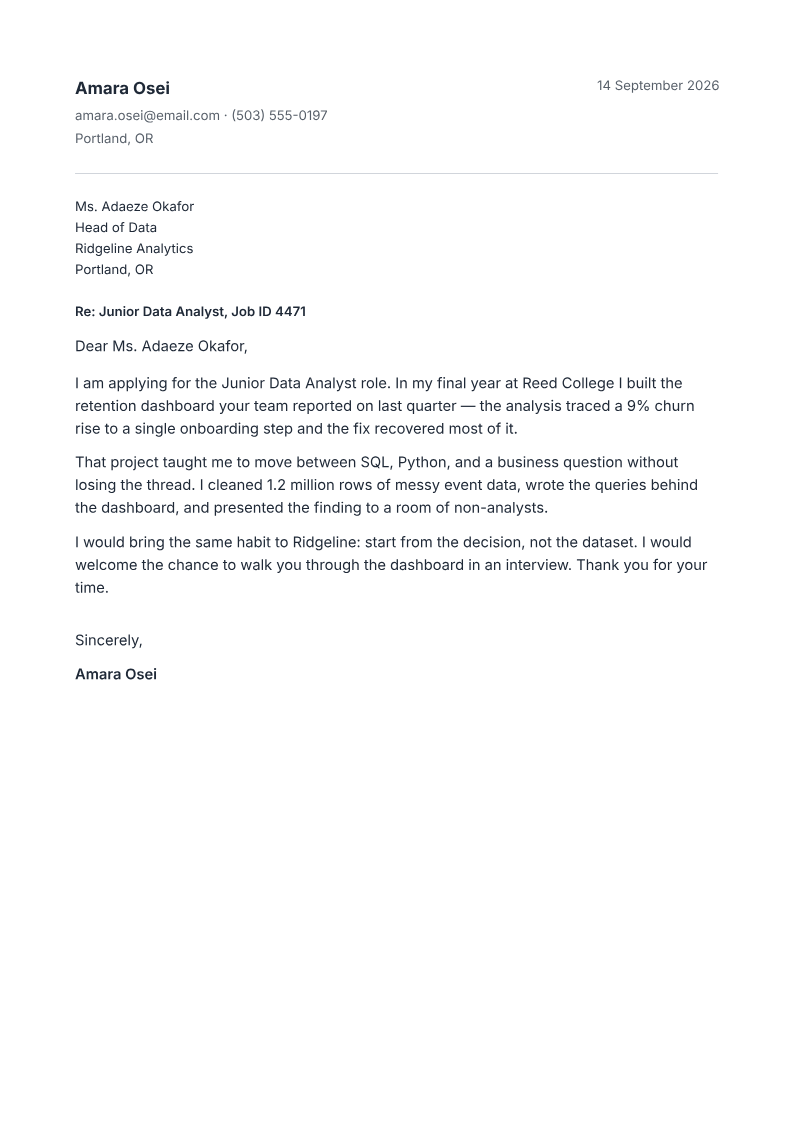
Like it? Open a copy in the studio and change anything by chatting. Free, no watermark.
Write my cover letterYou type it, it sets it
Every part of the document is something you can ask for in a sentence. This is a real edit, made on the example above.
The result paragraph, boxed mid-letter.
Questions, answered
Do I have to format it after it's written?
Most cover-letter tools write the words and leave you to make them look like a letter. Here the document is the output: the agent writes it and lays it out on A4 with real margins, a date, and a sign-off, so what you download is what you send.
Is the cover letter one page?
Yes: the cover-letter recipe targets a single page, and the finish check flags content that spills onto a near-empty second page.
Can it match my resume?
Yes. Set the same accent colour and heading font and the letter reads as part of the same application as your resume.
Is it free?
Free to start, no watermark, unlimited exports, around 20 PDFs a month on the free plan.
Word or PDF?
It produces a PDF, which is what most application systems ask for. A PDF preserves the layout exactly; a Word file can reflow on someone else's machine.
Single-column draft: inspect before applying
Supply the job description and your real experience. Ask for a draft connecting two relevant achievements to the role, then check names, dates and every claim. Do not invent qualifications or results. Request one column and verify extracted reading order; no layout guarantees acceptance by every ATS.
How long does it take to build the cover letter?
One short chat: describe what you need, check the live preview, download the PDF. You can keep changing it after that.
Can I bring a document I already have?
Yes. Attach up to four files at a time: images up to 5 MB, PDFs up to 10 MB, or text files up to 200 KB (.txt, .md, .csv, .json). For Word (.docx, not .doc), PDF, Markdown, HTML or LaTeX documents up to 10 MB each, choose ‘Import a document’ from the studio’s attachment menu. The agent rebuilds imports as editable blocks; original formatting may change.
Send a letter that reads like you
- One page on clean letterhead.
- Written around the job you want.
- Free to start, no watermark.
No credit card.