Single-Column Resume: ATS Formatting and PDF Example
Short answer: A single-column resume with standard headings reduces reliance on visual positioning. Check that contact details, experience, education and skills extract in a sensible order. This is a useful precaution, not certification against every applicant tracking system.
Most resume advice worries about how a resume looks. Automated extraction may produce a different reading order from the one your eyes follow. Parser behavior varies; some systems handle columns and tables better than others.
Checking extraction can reveal missing details or ordering problems before you submit. It cannot tell you why an employer accepted or rejected an application.
What an ATS actually sees
When your resume is uploaded, the system extracts text and tries to sort it into buckets: contact details, work history, education, skills. It's not reading your resume the way a person does — it's looking for patterns it recognises.
That means the parts of your resume that depend on position are the fragile ones:
- A skill in a right-hand sidebar has no sidebar in the extracted text. The parser reads left to right, row by row, and can interleave your two columns line by line.
- A table cell is often read as loose text, or dropped. Table structure rarely survives extraction cleanly.
- A company logo is an image; do not rely on it to communicate essential text.
- A phone number in a page header may be dropped — or worse, read as the header of every page.
None of this is deliberate. It's the natural result of turning a designed page back into plain text.
What breaks, and what to do instead
The pattern is the same in every row: prefer text over design. The more your resume relies on visual structure, the more a parser has to lose.
The single-column rules
A resume that parses reliably is almost boring to look at, and that's fine:
- One column, top to bottom. No sidebars, no two-up layouts, no text boxes.
- Standard headings. "Experience", "Education", "Skills", "Certifications" make sections easier to identify; exact parser rules vary.
- No tables for content. Dates and titles belong in the normal flow, not in a grid.
- No images. No headshot, no logo, no icon fonts for bullets — a plain
-or•is enough. - Plain, consistent dates. Pick one format ("June 2024 – Present") and keep it.
- A text-based PDF. If you scan or photograph your resume, the system gets a picture, not a resume. Export from a document tool that produces real text.
None of these make the resume worse. Readability for a parser and readability for a human are, conveniently, the same thing: clear text, clear order, clear headings.
Quick checklist before you submit
- One column, no sidebars
- Section headings use the standard words
- No tables wrapping your experience or skills
- No images or text-in-images
- Contact details in the body, not the header
- A text-based PDF with selectable text; do not rely on OCR to recover essential information
If you can select the text of your PDF and the words come out in a sensible order, you're most of the way there.
Check the reading order before applying
- Open the exported PDF and copy its text into a plain-text editor, or use a PDF text-extraction tool.
- Check that your name, email and phone number are present and correct.
- Read each experience entry in order: employer, role, dates and achievement bullets.
- Check that education and skills remain under the right headings, without duplicated or missing text.
- Fix any problems and repeat the check on the new export. Follow the employer's requested file format.
Text extraction is a useful check, not certification against every ATS. A clean result in one tool does not guarantee the same result in another system.
Build a single-column draft
The reason resumes break is that design tools make columns and tables easy to reach for. A tool that keeps the resume single-column by default removes the temptation.
You can open the resume builder, describe your experience, and the agent writes it into a single-column, standard-heading layout — then renders a print-ready PDF you can download. Ask it to rewrite a bullet to lead with the result, and it updates in place.
Single-column resume example
The following fictional recipe example shows a single-column layout. It is not a real applicant's resume or an ATS account trial.
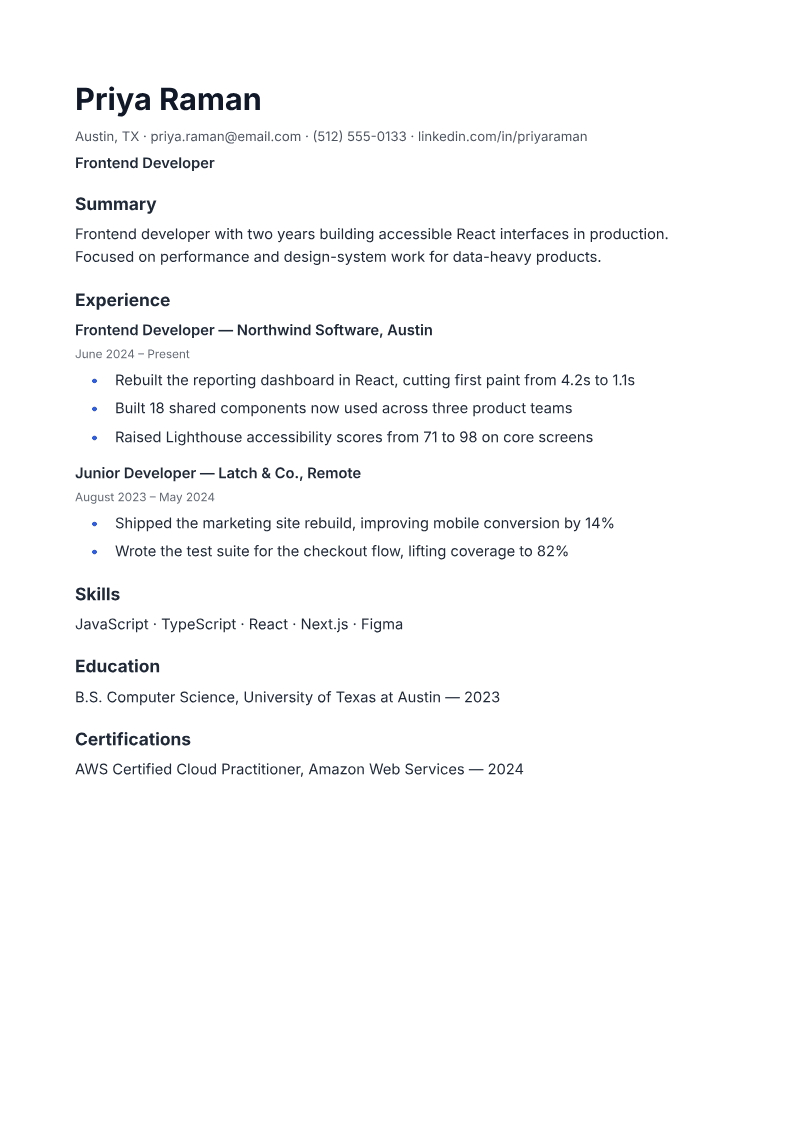
Apply the same checks to a cover letter or portfolio summary. The AI PDF generator also supports columns and tables, so explicitly request a single-column resume and inspect the result rather than assuming every document has that layout.
Frequently asked questions
Do ATS systems reject PDFs? Follow the employer's accepted file formats. Prefer a text-based PDF when PDF is accepted, and check its extracted text. Scanned PDFs may require OCR; selectable text alone does not guarantee compatibility.
Can I use a two-column resume template? Some parsers handle two columns; others can interleave text. A single column reduces that particular ordering risk but does not eliminate every parsing issue. Check the exported reading order before submitting.
Do keywords really matter? They matter as substance, not as tricks. Use the words the job posting uses for skills and tools you genuinely have. Keyword-stuffing is visible to the human who eventually reads the shortlist.
Should my resume be one page or two? Length matters less than clarity. Use the space your experience genuinely needs, and put the most relevant material where a reader — or a parser — will find it first.
Describe your experience and ask PaintPDF for a single-column resume with standard headings. Inspect the PDF before applying. Free to start, no watermark.
Open the resume builder