- Real document blocks
- Tables and headings stay selectable and printable.
- Live A4 preview
- What you see is what the PDF prints.
- Edit by chatting
- Change anything with one sentence.
- Free download
- No watermark, unlimited exports.
Everything a proper invoice needs
Every invoice is built from real document blocks, not a picture of a table, so the numbers stay selectable and printable, with an optional accent header in your brand colour.
Where they usually go wrong
It has to look like you do this for a living.
A Word file shows the seams: floating tables, mismatched type, spacing you fixed twice.
Template sites make you retype the job into their form.
Twelve fields before you see a page, and the result still looks like their template.
One change and the layout falls apart.
Move a line and the table, the headings, and the footer all need re-fixing.
- A totals block that adds up: subtotal, tax, and the amount due, aligned right
- Line items with quantity, rate, and amount in real table columns
- Invoice number, issue date, and due date, where clients look for them
- From and to blocks with your details, the client's, and your payment terms
| Subtotal | $2,530.00 |
| Deposit received (25%) | -$632.50 |
| Tax (8%) | $202.40 |
How it works
Describe it
Type what you need in plain language: the client, the line items, the tone. Attach a file if you have one.
Refine by chatting
The agent builds the document with real tables and headings, and you change anything just by asking. A live A4 preview updates as it works.
Download the PDF
Export a print-ready A4 PDF. No watermark on the free plan, and unlimited exports.
Free to start. No watermark.
See a finished invoice
Pick an example and the full PDF renders here in seconds. Download it if you like it, no sign-in needed.
Freelance photography invoice with 8% sales tax and a 25% deposit
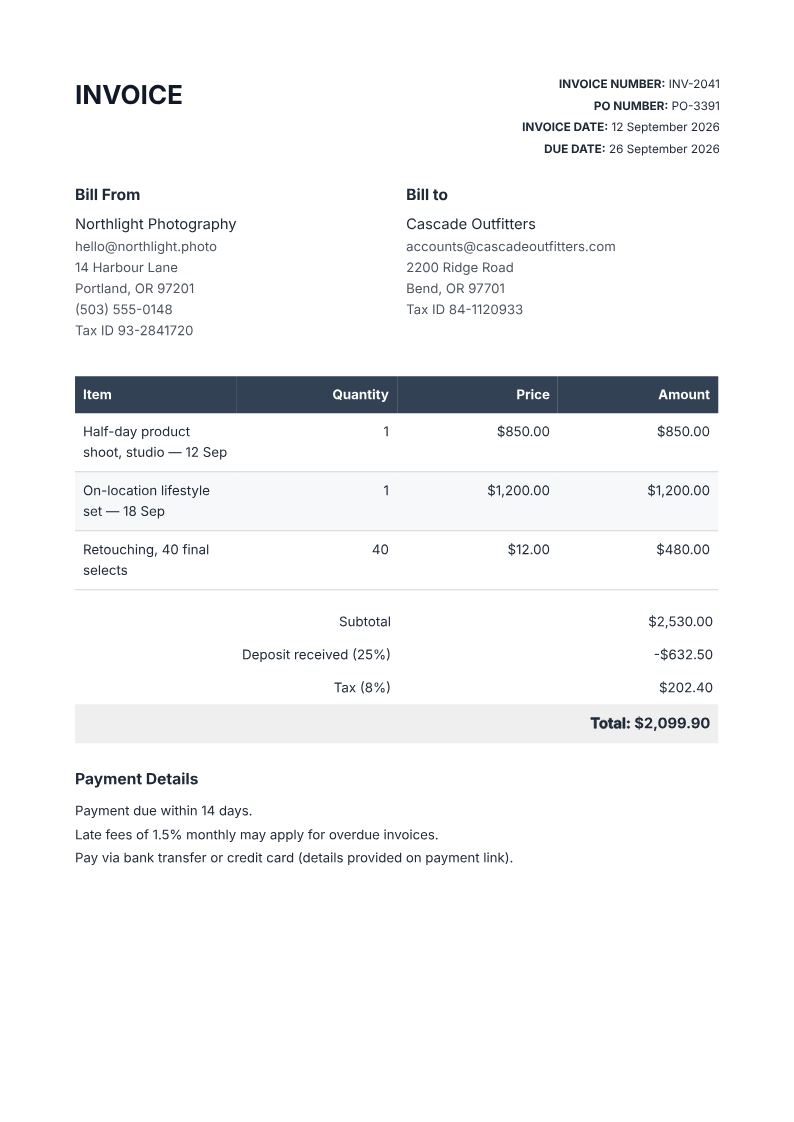
Like it? Open a copy in the studio and change anything by chatting. Free, no watermark.
Generate my invoiceYou type it, it sets it
Every part of the document is something you can ask for in a sentence. This is a real edit, made on the example above.
A deposit line reduces the balance; the example taxes the full subtotal.
| Subtotal | $2,530.00 |
| Deposit received (25%) | -$632.50 |
Questions, answered
Try the photography invoice template
The Northlight Photography example is a reusable starting layout: two shoots and retouching, with a line-items table, deposit, tax and payment terms. Download the finished example without signing in, or open the invoice recipe in the studio and replace the client and job details.
- Prompt: Make an invoice for my photography business with a $850 studio shoot, a $1,200 location shoot and 40 retouched images at $12 each. Show a 25% deposit already paid, 8% tax on the full subtotal, an issue date of September 12, 2026, and a due date of September 26, 2026 with net-14 terms.
- Example arithmetic: $2,530 subtotal + $202.40 tax - $632.50 deposit = $2,099.90 due. Tax rules and deposit treatment depend on your jurisdiction.
- Keep the issue date, due date and payment terms consistent before sending.
Download the photography invoice PDFInvoice steps, deposits and tax arithmetic
Can the AI calculate totals?
It lays out quantities, rates, and an amount per line, then a totals block you can ask it to add tax to. Check the arithmetic against your own records before sending. It is your invoice.
Is the invoice free to download?
Yes. The free plan has no watermark and unlimited exports; you get around 20 PDFs a month before a paid plan's larger allowance.
Can I put my own business name and logo on it?
Your business details are just text, so you can put in whatever you use. A logo is an image block, which needs a JPEG or PNG URL. Paste one and the agent places it.
Is this invoice legally valid?
It is a clean, printable record of what was billed, a document rather than a tax or bookkeeping system. Keep whatever records your jurisdiction and accountant require separately.
Invoice or receipt?
An invoice asks to be paid; a receipt confirms it was. This generator makes invoices: a description of work, what it costs, and when it's due. If you need proof of payment afterwards, ask the agent to turn the same document into a paid receipt.
When to send it
Most freelance and small-business invoices use one of three terms. Pick the one your contract already implies:
- Net-14: due two weeks after issue, the common default for freelancers
- Net-30: due in a month, standard for larger clients with accounts payable
- Due on receipt: for small jobs and new clients
Before billing: record the work or the shipment
For a service job, agree the scope and record tasks, materials and sign-off on a work order before billing. For shipped goods, put SKUs and quantities on a separate packing slip; the invoice carries the prices and payment terms. Keep customer and job references consistent across the documents.
Create a printable work order with sign-off linesMake a packing slip without invoice prices
How long does it take to build the invoice?
One short chat: describe what you need, check the live preview, download the PDF. You can keep changing it after that.
Can I bring a document I already have?
Yes. Attach up to four files at a time: images up to 5 MB, PDFs up to 10 MB, or text files up to 200 KB (.txt, .md, .csv, .json). For Word (.docx, not .doc), PDF, Markdown, HTML or LaTeX documents up to 10 MB each, choose ‘Import a document’ from the studio’s attachment menu. The agent rebuilds imports as editable blocks; original formatting may change.
Send an invoice that looks like your business
- Line items and totals that read right.
- Your details and your brand on every page.
- Free to start, no watermark.
No credit card.