- Real document blocks
- Tables and headings stay selectable and printable.
- Live A4 preview
- What you see is what the PDF prints.
- Edit by chatting
- Change anything with one sentence.
- Free download
- No watermark, unlimited exports.
Build a work order from a job brief
A work order authorises a job and records what happened. The layout covers both halves.
Where they usually go wrong
It has to look like you do this for a living.
A Word file shows the seams: floating tables, mismatched type, spacing you fixed twice.
Template sites make you retype the job into their form.
Twelve fields before you see a page, and the result still looks like their template.
One change and the layout falls apart.
Move a line and the table, the headings, and the footer all need re-fixing.
- Client and site details, so the technician knows where to go
- A scope line: what was requested and what finished looks like
- Tasks with hours and status, and materials with costs
- Signature lines for the client and the technician
| Material | Quantity | Cost |
|---|---|---|
| Run capacitor, 45/5 µF | 1 | $38.00 |
| Contactor, 40 A | 1 | $54.00 |
One form for every trade
The same structure fits service calls, installs, and maintenance visits:
Repairs
Diagnose, fix, and test, with parts at cost plus a margin
Installations
Removal, install, and a commissioning check
Maintenance
A recurring checklist with readings
Field service
Site details, arrival window, and a follow-up visit
How it works
Describe it
Type what you need in plain language: the client, the line items, the tone. Attach a file if you have one.
Refine by chatting
The agent builds the document with real tables and headings, and you change anything just by asking. A live A4 preview updates as it works.
Download the PDF
Export a print-ready A4 PDF. No watermark on the free plan, and unlimited exports.
Free to start. No watermark.
Download a sample work order PDF
Pick an example and the full PDF renders here in seconds. Download it if you like it, no sign-in needed.
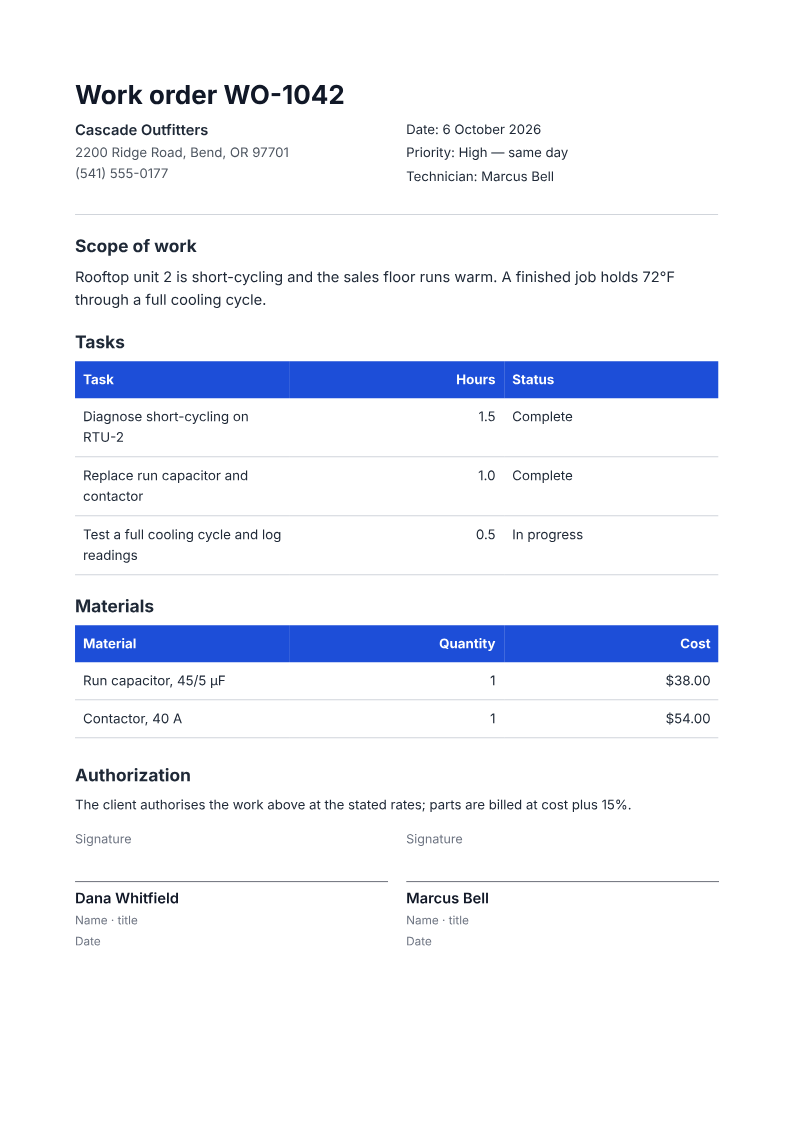
HVAC repair work order with tasks, parts, and sign-off
Like it? Open a copy in the studio and change anything by chatting. Free, no watermark.
Create my work orderYou type it, it sets it
Every part of the document is something you can ask for in a sentence. This is a real edit, made on the example above.
One more row in the tasks table, with hours and status.
| Task | Hours | Status |
|---|---|---|
| Diagnose short-cycling on RTU-2 | 1.5 | Complete |
| Replace run capacitor and contactor | 1.0 | Complete |
| Test a full cooling cycle and log readings | 0.5 | In progress |
Questions, answered
What does the signature actually record?
The printed lines provide space for client and technician sign-off. An unsigned generated PDF does not establish approval, and PaintPDF does not verify signatures or guarantee legal enforceability. Confirm the terms and obtain the appropriate signatures yourself.
Does it include a signature block?
Yes: signature lines for the client and the technician print at the bottom, so the authorisation can be signed on site.
Can I sign this work order digitally?
PaintPDF includes printed signature lines, not an e-signature or signature-verification service. Use a separate signing service if you need electronic signatures.
Can it list parts and prices?
The materials table has material, quantity, and cost. Parts can be listed at cost, with the margin stated in the authorisation line.
Is it free?
Free to start, no watermark, unlimited exports, around 20 PDFs a month on the free plan.
Work order or invoice?
A work order authorises the work; an invoice asks to be paid for it. Many jobs need both — generate the work order first, then the invoice when the job closes.
Try the HVAC work order example
Fictional work order WO-1042 for Cascade Outfitters covers a short-cycling rooftop unit: three tasks with hours and status, a $38 capacitor, a $54 contactor and printed client/technician sign-off lines. This is a deterministic recipe render, not a live agent trial. Download it without an account, or explore the appliance-install demo for another service job.
From a service request to a signed work order
Start with the customer, site, requested work and what completion means. Separate an estimate of hours and materials from the record of work actually performed. In the HVAC example, the final cooling-cycle test is still in progress; do not present the whole job as complete just because the PDF is finished.
- Prompt: Create an A4 work order using my job brief. Include the job reference, customer and site, scope, a task / estimated hours / status table, materials and costs, and blank client and technician signature lines. Use only supplied facts. Mark unscheduled tasks as pending and do not fabricate approval or signatures.
- Before work: confirm the scope, estimate, exclusions and authorization with the customer. After work: update actual hours, parts and incomplete tasks, then obtain the appropriate sign-off.
- The printed document is not a dispatch system, live job tracker or electronic-signature service. Keep those records in the tools you already use.
How long does it take to build the work order?
One short chat: describe what you need, check the live preview, download the PDF. You can keep changing it after that.
Can I bring a document I already have?
Yes. Attach up to four files at a time: images up to 5 MB, PDFs up to 10 MB, or text files up to 200 KB (.txt, .md, .csv, .json). For Word (.docx, not .doc), PDF, Markdown, HTML or LaTeX documents up to 10 MB each, choose ‘Import a document’ from the studio’s attachment menu. The agent rebuilds imports as editable blocks; original formatting may change.
Authorise the job before it starts
- Scope, tasks, and materials on one page.
- Signature lines for client and technician.
- Free to start, no watermark.
No credit card.