- Real document blocks
- Tables and headings stay selectable and printable.
- Live A4 preview
- What you see is what the PDF prints.
- Edit by chatting
- Change anything with one sentence.
- Free download
- No watermark, unlimited exports.
Everything a resume needs, in order
Single column end to end, the layout a parser reads most reliably. Section headings use the standard words (Experience, Education, Skills), the skills are one line rather than a table, and there are no graphics for a parser to lose.
Where they usually go wrong
It has to look like you do this for a living.
A Word file shows the seams: floating tables, mismatched type, spacing you fixed twice.
Template sites make you retype the job into their form.
Twelve fields before you see a page, and the result still looks like their template.
One change and the layout falls apart.
Move a line and the table, the headings, and the footer all need re-fixing.
- Standard headings: Experience, Education, Skills
- Contact details in the body, never a dropped header
- Skills on one line, not in a table a parser loses
- No columns or graphics for a parser to scramble
How it works
Describe it
Type what you need in plain language: the client, the line items, the tone. Attach a file if you have one.
Refine by chatting
The agent builds the document with real tables and headings, and you change anything just by asking. A live A4 preview updates as it works.
Download the PDF
Export a print-ready A4 PDF. No watermark on the free plan, and unlimited exports.
Free to start. No watermark.
See a finished resume
Pick an example and the full PDF renders here in seconds. Download it if you like it, no sign-in needed.
Resume for a junior frontend developer, React, 1 year
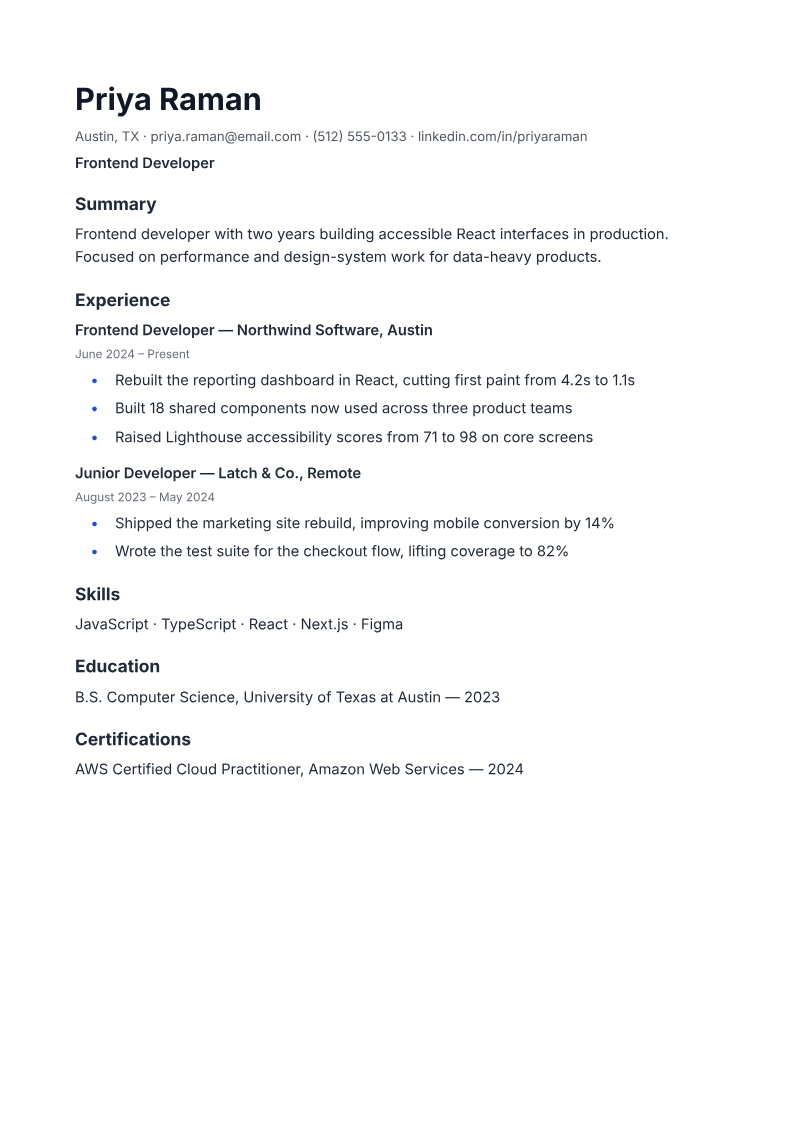
Like it? Open a copy in the studio and change anything by chatting. Free, no watermark.
Build my resumeYou type it, it sets it
Every part of the document is something you can ask for in a sentence. This is a real edit, made on the example above.
A third bullet under the first role.
Questions, answered
What does an ATS see in a designed resume?
An applicant tracking system turns your resume back into plain text, in order, with the formatting stripped out, and anything that relies on visual position can scramble or vanish:
- Two columns can interleave line by line as the parser reads across
- Table cells are often dropped or run together
- A logo or headshot isn't text, so it isn't read at all
- Contact details in the page header can be missed entirely
Is it ATS-friendly?
The recipe uses one column, standard headings and contact details in the body. These reduce reliance on visual positioning, but do not certify compatibility with every ATS. Check the exported text and follow the employer's file requirements.
Is the download free?
Yes: free to start, no watermark, unlimited exports, around 20 PDFs a month on the free plan.
PDF or DOCX?
This produces a text-based PDF, not a DOCX. Follow the employer's accepted formats and check that contact details, experience and education extract in order before submitting.
Can the AI rewrite my bullet points?
Yes. Ask it to lead with outcomes, add numbers, or trim a bullet, and it rewrites that line in place while you watch the preview.
Tailored by prompt, bullet by bullet
Paste the job posting and ask the agent to lead each bullet with the result it produced, to quantify it, or to bring the most relevant experience to the top. The resume is a document you edit by talking, not a form you re-fill.
How long does it take to build the resume?
One short chat: describe what you need, check the live preview, download the PDF. You can keep changing it after that.
Can I bring a document I already have?
Yes. Attach up to four files at a time: images up to 5 MB, PDFs up to 10 MB, or text files up to 200 KB (.txt, .md, .csv, .json). For Word (.docx, not .doc), PDF, Markdown, HTML or LaTeX documents up to 10 MB each, choose ‘Import a document’ from the studio’s attachment menu. The agent rebuilds imports as editable blocks; original formatting may change.
Send a resume that gets read
- One column, standard headings.
- Tailored to the posting by chat.
- Free to start, no watermark.
No credit card.