- Real document blocks
- Tables and headings stay selectable and printable.
- Live A4 preview
- What you see is what the PDF prints.
- Edit by chatting
- Change anything with one sentence.
- Free download
- No watermark, unlimited exports.
What is PaintPDF's expense report generator?
PaintPDF's expense report generator turns a list of receipts into a printable A4 claim: a dated table of expenses by category and amount, a total to reimburse, a note for the approver and a signature line. Edit it by chatting. Free to start, no watermark.
Get a free expense report template: pick an example in the live demo and download the PDF, or open it in the studio to make it yours. No sign-in to download, no watermark.
Everything an expense report needs
An expense report is a claim: what you spent, when, on what, and what should come back to you. The layout keeps the claim and the total together.
Where they usually go wrong
It has to look like you do this for a living.
A Word file shows the seams: floating tables, mismatched type, spacing you fixed twice.
Template sites make you retype the job into their form.
Twelve fields before you see a page, and the result still looks like their template.
One change and the layout falls apart.
Move a line and the table, the headings, and the footer all need re-fixing.
- Employee, period and cost centre at the top
- A dated table: date, category, description, amount
- A total to reimburse, after any personal items
- A note for the approver and a signature line
| Subtotal | $983.50 |
| Personal (non-reimbursable) | -$74.50 |
What each field is for
The fields an approver checks first:
Category
Travel, accommodation, meals, registration, so the claim maps to a budget
Personal line
Anything you are not claiming, subtracted so the total is honest
Description
What was bought and why, so a receipt is not needed to decode the row
Receipts
Whether they are attached, which most policies require
How it works
Describe it
Type what you need in plain language: the client, the line items, the tone. Attach a file if you have one.
Refine by chatting
The agent builds the document with real tables and headings, and you change anything just by asking. A live A4 preview updates as it works.
Download the PDF
Export a print-ready A4 PDF. No watermark on the free plan, and unlimited exports.
Free to start. No watermark.
See a finished expense report
Pick an example and the full PDF renders here in seconds. Download it if you like it, no sign-in needed.
Conference travel expense report with a non-reimbursable line
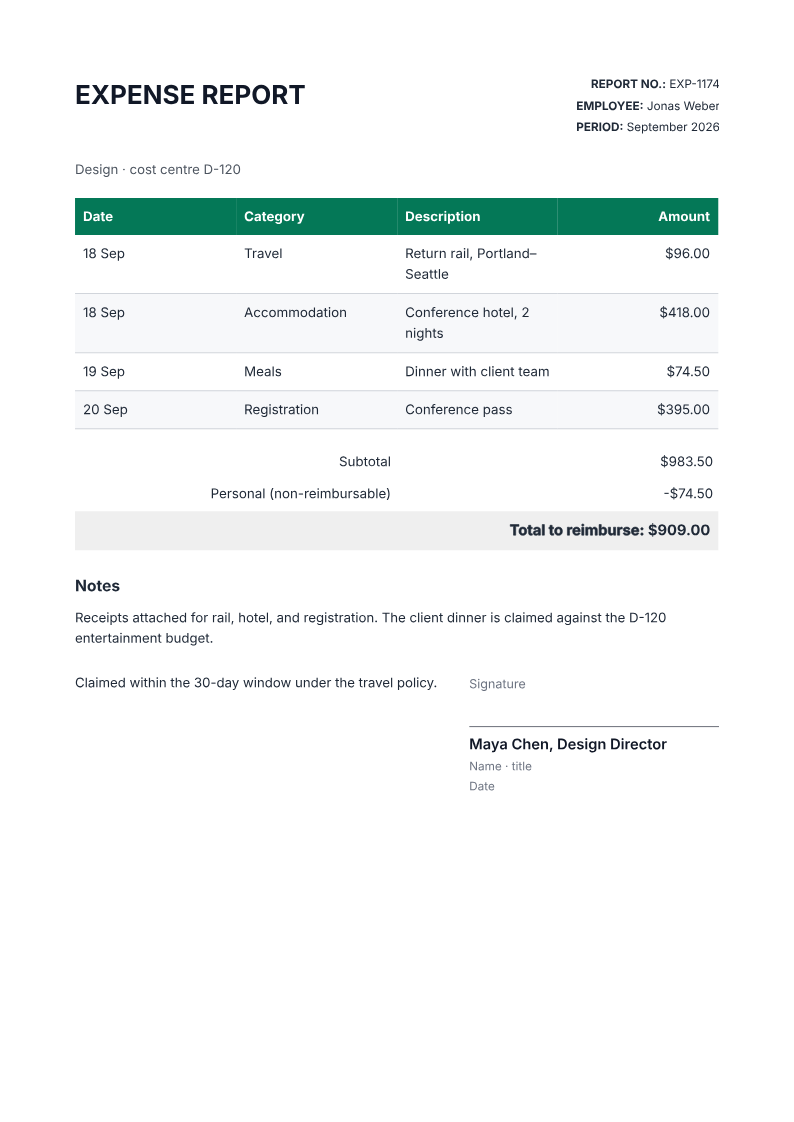
Like it? Open a copy in the studio and change anything by chatting. Free, no watermark.
Make my expense reportYou type it, it sets it
Every part of the document is something you can ask for in a sentence. This is a real edit, made on the example above.
One more row in the expenses table, dated like the rest.
| Date | Category | Description | Amount |
|---|---|---|---|
| 18 Sep | Travel | Return rail, Portland–Seattle | $96.00 |
| 18 Sep | Accommodation | Conference hotel, 2 nights | $418.00 |
| 19 Sep | Meals | Dinner with client team | $74.50 |
| 20 Sep | Registration | Conference pass | $395.00 |
Questions, answered
Expense report or invoice?
An invoice asks a client to pay your business; an expense report claims money back from your employer or a budget. Both total to an amount due, but the expense report is internal, so it leans on categories and receipts rather than payment terms.
How do I create an expense report?
List your expenses with dates, categories and amounts, and the agent lays out a printable A4 claim with a dated table, a total to reimburse and an approver line. Attach your receipts and check the total before submitting.
Can I split reimbursable and personal expenses?
Yes. The totals stack has a non-reimbursable line that is subtracted from the subtotal, so personal items are shown but not claimed.
Can I add mileage or per-diem?
Add them as categories with their own rows and amounts. If a policy uses a rate, calculate the amount first and enter the figure.
Is there a free expense report template?
Yes. The demo above is a worked expense report example you can copy, and the same layout acts as a blank template: describe your expense rows and the agent fills the table, subtotal and total for you.
Does it store my receipts?
No. It builds the PDF from the figures you give it. Receipts stay in your own records, and you should not upload sensitive documents you do not need to.
Is it free?
Free to start, no watermark, unlimited exports, around 20 PDFs a month on the free plan.
An expense report template you fill from receipts
The layout is a fill-in-the-facts expense report template: the example above shows the finished page, and the same structure works as a blank form you record the rows on by hand. A worked example is often clearer than an empty grid, so the demo renders one you can copy or replace.
- An expense report example with dated rows and a total to reimburse
- A free expense report template for conference or client travel
- A printable expense form for an approver to sign
The receipts are the report
An expense report without receipts is a list of assertions. Attach them, keep the categories consistent with your policy, and subtract anything personal before you claim. The form organises the claim; it does not verify the spend.
Turn receipts into a claim
List the expenses with their dates, categories and amounts, and mark anything you are not claiming. Check the total and the receipts before you submit.
- Prompt: Create an A4 expense report from my receipts. Include the employee, period and cost centre, a dated table with category, description and amount, a subtotal, any non-reimbursable line subtracted, a total to reimburse, a note for the approver and a signature line. Use only the amounts I give.
- Check each amount against its receipt and confirm the categories match your policy.
- The PDF does not store or verify receipts; keep the originals in your own records.
How long does it take to build the expense report?
One short chat: describe what you need, check the live preview, download the PDF. You can keep changing it after that.
Can I bring a document I already have?
Yes. Attach up to four files at a time: images up to 5 MB, PDFs up to 10 MB, or text files up to 200 KB (.txt, .md, .csv, .json). For Word (.docx, not .doc), PDF, Markdown, HTML or LaTeX documents up to 10 MB each, choose ‘Import a document’ from the studio’s attachment menu. The agent rebuilds imports as editable blocks; original formatting may change.
Claim the money back in one page
- Every expense dated, categorised, and totalled.
- A clear line for what is not reimbursable.
- Free to start, no watermark.
No credit card.