- Real document blocks
- Tables and headings stay selectable and printable.
- Live A4 preview
- What you see is what the PDF prints.
- Edit by chatting
- Change anything with one sentence.
- Free download
- No watermark, unlimited exports.
PaintPDF produces a structured document skeleton, not legal advice. Have a qualified lawyer review any NDA before you sign or send it.
What is PaintPDF's nda generator?
PaintPDF's NDA generator turns a description of the deal into a printable A4 mutual non-disclosure agreement: the parties, defined confidential information, permitted use and exclusions, the standard of care, term and survival, governing law and signature blocks, with placeholders where the specifics belong. Edit it by chatting. It produces a structured skeleton, not legal advice; free to start, no watermark.
Get a free nda template: pick an example in the live demo and download the PDF, or open it in the studio to make it yours. No sign-in to download, no watermark.
Everything an NDA needs
An NDA is short by design: it says who is sharing what, why, and for how long. The layout keeps the parts a reviewer checks in order.
Where they usually go wrong
It has to look like you do this for a living.
A Word file shows the seams: floating tables, mismatched type, spacing you fixed twice.
Template sites make you retype the job into their form.
Twelve fields before you see a page, and the result still looks like their template.
One change and the layout falls apart.
Move a line and the table, the headings, and the footer all need re-fixing.
- The parties, named and defined once
- What counts as confidential information, and what does not
- The permitted use, so the information cannot be repurposed
- A term, a governing law, and signature blocks
What each section is for
The clauses a reviewer looks for first:
Confidential information
The categories covered, and any marking rule
Permitted use
The only purpose the information may be used for, and who may see it
Exclusions
Information already public, independently developed, or required by law
Term
How long the obligations last, and how long they survive the discussions
Governing law
Which jurisdiction applies, and where disputes are heard
How it works
Describe it
Type what you need in plain language: the client, the line items, the tone. Attach a file if you have one.
Refine by chatting
The agent builds the document with real tables and headings, and you change anything just by asking. A live A4 preview updates as it works.
Download the PDF
Export a print-ready A4 PDF. No watermark on the free plan, and unlimited exports.
Free to start. No watermark.
See a finished NDA
Pick an example and the full PDF renders here in seconds. Download it if you like it, no sign-in needed.
Mutual NDA between two companies, two-year term
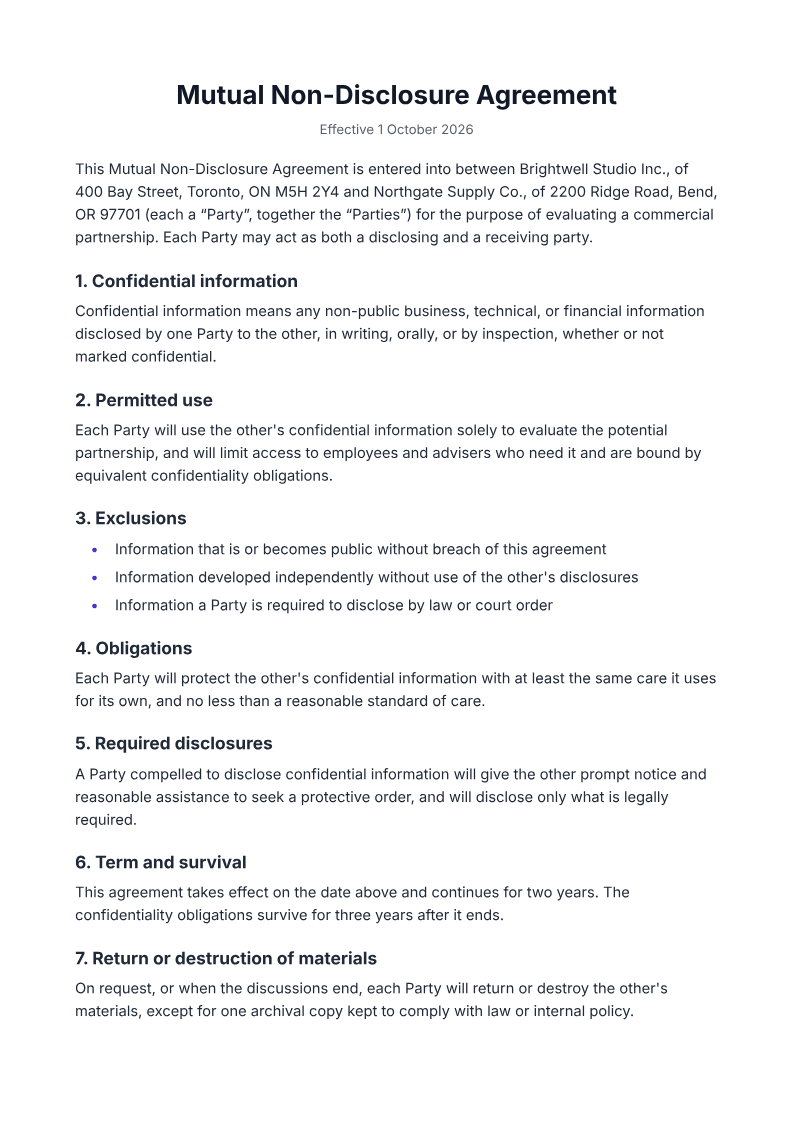
Like it? Open a copy in the studio and change anything by chatting. Free, no watermark.
Draft my NDAYou type it, it sets it
Every part of the document is something you can ask for in a sentence. This is a real edit, made on the example above.
A third exclusion in the list under clause 3.
Questions, answered
NDA or service agreement?
An NDA protects information you share before or alongside a deal; a service agreement governs the work itself, with scope, fees and ownership. They often travel together: an NDA for the conversation, a service agreement for the project. This page makes the NDA.
How do I create an NDA?
Describe the parties, the purpose and the term, and the agent drafts a formatted A4 mutual NDA with numbered clauses, defined parties and signature blocks. Have a qualified lawyer review it before you sign or send it.
Is this legal advice?
No. It is a formatted starting document with placeholders for your specifics, not tailored to your jurisdiction and not reviewed by a lawyer. Treat it as a draft for review, not legal advice.
Mutual or one-way NDA?
This recipe is mutual, where both sides may disclose. If only one side is sharing information, ask the agent to make it one-way so the obligations sit with the receiving party.
Are signatures included?
A signature block is, for printing and signing by hand. There is no e-signature service built in; the output is a PDF you print or sign however you already do.
Is it free?
Free to start, no watermark, unlimited exports, around 20 PDFs a month on the free plan.
Mutual or one-way?
Choose the shape before you draft, because it changes who carries the obligation:
- Mutual: both sides may disclose, so each is protected, the default when a partnership is being explored
- One-way: only one side discloses, typical when a vendor receives a client's information
- This recipe is a mutual NDA; ask the agent to make it one-way if only one side is sharing
Review an NDA draft before you use it
Supply the parties, the purpose, the information covered, the permitted use, the exclusions and the term. Ask qualified counsel to review jurisdiction, enforceability and signature requirements before you sign.
- Prompt: Draft a mutual NDA from my details. Include the parties, the purpose, the categories of confidential information, the permitted use and exclusions, the standard of care, the term and survival, return of materials, and governing law, with signature blocks. Use only the facts I give and mark anything missing.
- Have a qualified lawyer review jurisdiction, enforceability and signature requirements before you sign or send it.
- PaintPDF produces a structured skeleton, not legal advice, and does not verify signatures or enforceability.
How long does it take to build the nda?
One short chat: describe what you need, check the live preview, download the PDF. You can keep changing it after that.
Can I bring a document I already have?
Yes. Attach up to four files at a time: images up to 5 MB, PDFs up to 10 MB, or text files up to 200 KB (.txt, .md, .csv, .json). For Word (.docx, not .doc), PDF, Markdown, HTML or LaTeX documents up to 10 MB each, choose ‘Import a document’ from the studio’s attachment menu. The agent rebuilds imports as editable blocks; original formatting may change.
Start the conversation on paper
- Parties, clauses, and signature blocks.
- Placeholders where the specifics belong.
- Free to start, no watermark.
No credit card.