- Real document blocks
- Tables and headings stay selectable and printable.
- Live A4 preview
- What you see is what the PDF prints.
- Edit by chatting
- Change anything with one sentence.
- Free download
- No watermark, unlimited exports.
What is PaintPDF's timesheet generator?
PaintPDF's timesheet generator turns a week of work into a printable A4 timesheet: employee, period and project details, a day-by-day grid of hours and notes, a total, and an approver signature. Edit it by chatting. Free to start, no watermark.
Get a free timesheet template: pick an example in the live demo and download the PDF, or open it in the studio to make it yours. No sign-in to download, no watermark.
Everything a timesheet needs
A timesheet is a record of hours worked against a project, signed off by someone. The layout keeps the week and the total in one place.
Where they usually go wrong
It has to look like you do this for a living.
A Word file shows the seams: floating tables, mismatched type, spacing you fixed twice.
Template sites make you retype the job into their form.
Twelve fields before you see a page, and the result still looks like their template.
One change and the layout falls apart.
Move a line and the table, the headings, and the footer all need re-fixing.
- Employee, period, and project at the top
- A day-by-day grid: day, date, hours, notes
- A total for the week
- An approver signature line
| Day | Date | Hours | Notes |
|---|---|---|---|
| Monday | 6 Oct | 7.5 | Dashboard rebuild |
| Tuesday | 7 Oct | 8 | Design-system components |
| Wednesday | 8 Oct | 7 | Code review and pairing |
| Thursday | 9 Oct | 8 | Checkout test suite |
| Friday | 10 Oct | 6 | Sprint demo and retro |
| Saturday | — | 0 | — |
| Sunday | — | 0 | — |
What each field is for
The fields that make a timesheet auditable:
Project
What the hours are billed or costed against
Notes
What each day's hours covered, so a total is not just a number
Approver
Who confirms the hours are correct
Period
The week the hours belong to, so the pay or billing run is unambiguous
How it works
Describe it
Type what you need in plain language: the client, the line items, the tone. Attach a file if you have one.
Refine by chatting
The agent builds the document with real tables and headings, and you change anything just by asking. A live A4 preview updates as it works.
Download the PDF
Export a print-ready A4 PDF. No watermark on the free plan, and unlimited exports.
Free to start. No watermark.
See a finished timesheet
Pick an example and the full PDF renders here in seconds. Download it if you like it, no sign-in needed.
Weekly timesheet, five days of project hours
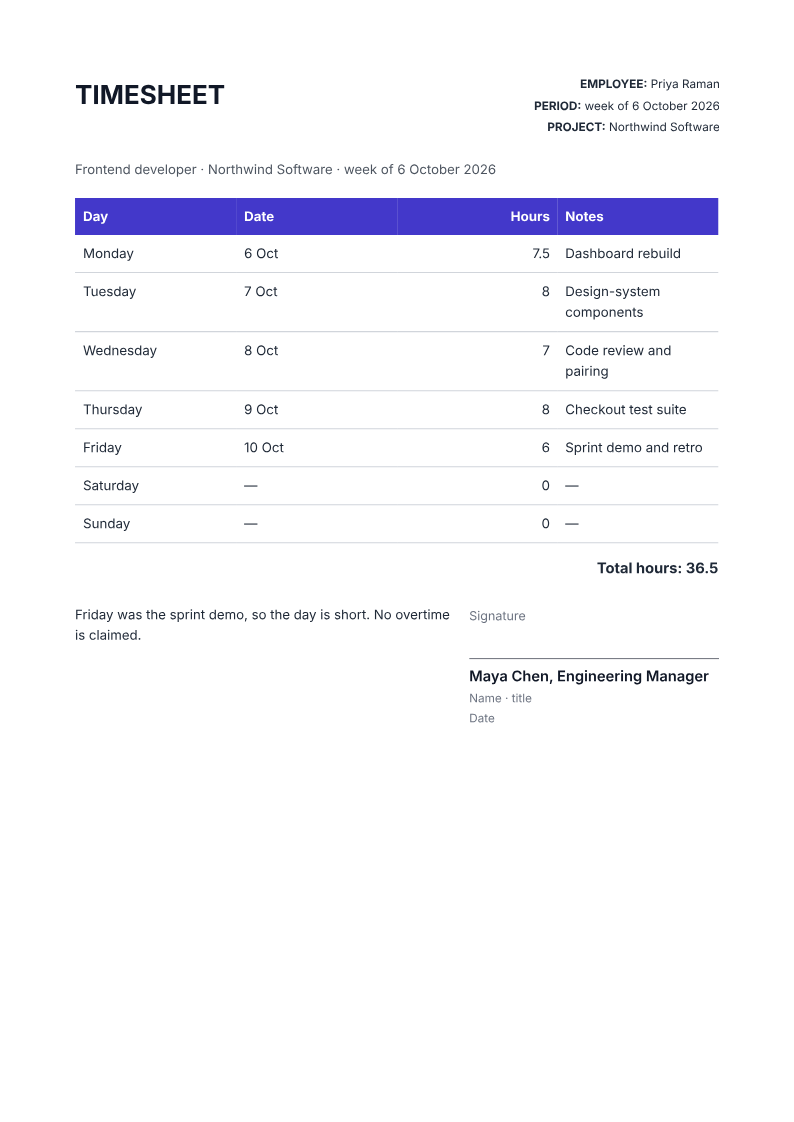
Like it? Open a copy in the studio and change anything by chatting. Free, no watermark.
Make my timesheetYou type it, it sets it
Every part of the document is something you can ask for in a sentence. This is a real edit, made on the example above.
One more day in the grid, with its hours and note.
| Day | Date | Hours | Notes |
|---|---|---|---|
| Monday | 6 Oct | 7.5 | Dashboard rebuild |
| Tuesday | 7 Oct | 8 | Design-system components |
| Wednesday | 8 Oct | 7 | Code review and pairing |
| Thursday | 9 Oct | 8 | Checkout test suite |
| Friday | 10 Oct | 6 | Sprint demo and retro |
Questions, answered
Timesheet or time-tracking app?
A time-tracking app captures hours as you work; a timesheet is the signed summary you submit for a week. The two work together: track in the tool, then send the timesheet for approval and payroll.
How do I create a timesheet?
Give the agent the employee, the period, the project and the hours for each day, and it lays out a printable A4 timesheet with a day-by-day grid, a total and an approver line. Check the total before submitting it.
Can it cover two weeks or a month?
The recipe targets one week. Ask the agent for a second page or a longer grid if you need a fortnight or a month, and check that every day is listed.
Can I track hours per project?
Yes. Use a row per project or put the project in the notes column, and ask for a total per project if the week is split across several.
Does it calculate pay?
No. It records hours and totals them. Rates, overtime rules and pay calculations belong in your payroll system, not the timesheet.
Is it free?
Free to start, no watermark, unlimited exports, around 20 PDFs a month on the free plan.
Hours that stand up to a query
If a client or a manager queries a week, the note on each day answers it faster than the total does. Keep the notes short and specific, and flag anything unusual, such as a short day or approved overtime, in the line for the approver.
Build a timesheet from your week
Give the agent the employee, the period, the project and the hours for each day. Check the total and the notes, then get it signed off.
- Prompt: Create an A4 timesheet for my week. Include the employee, period and project, a day-by-day grid with hours and a short note, a total for the week, and an approver signature line. Use only the hours I give and leave unworked days at zero.
- Check the total against the daily figures and confirm the notes describe the work, not just the hours.
- The PDF is a record, not a time-tracking or payroll system; keep your own source data.
How long does it take to build the timesheet?
One short chat: describe what you need, check the live preview, download the PDF. You can keep changing it after that.
Can I bring a document I already have?
Yes. Attach up to four files at a time: images up to 5 MB, PDFs up to 10 MB, or text files up to 200 KB (.txt, .md, .csv, .json). For Word (.docx, not .doc), PDF, Markdown, HTML or LaTeX documents up to 10 MB each, choose ‘Import a document’ from the studio’s attachment menu. The agent rebuilds imports as editable blocks; original formatting may change.
Record the week while it is fresh
- Every day with its hours and a note.
- A total and an approver line.
- Free to start, no watermark.
No credit card.