- Real document blocks
- Tables and headings stay selectable and printable.
- Live A4 preview
- What you see is what the PDF prints.
- Edit by chatting
- Change anything with one sentence.
- Free download
- No watermark, unlimited exports.
What is PaintPDF's newsletter generator?
PaintPDF's newsletter generator turns your news into a printable A4 issue: a masthead with the name, issue and date, a lead story with a headline, two columns of short items, and a sign-off with a contact. Edit it by chatting. Free to start, no watermark.
Get a free newsletter template: pick an example in the live demo and download the PDF, or open it in the studio to make it yours. No sign-in to download, no watermark.
Everything a newsletter needs
A newsletter is skimmed before it is read, so the layout leads with one story and groups the rest into short items.
Where they usually go wrong
It has to look like you do this for a living.
A Word file shows the seams: floating tables, mismatched type, spacing you fixed twice.
Template sites make you retype the job into their form.
Twelve fields before you see a page, and the result still looks like their template.
One change and the layout falls apart.
Move a line and the table, the headings, and the footer all need re-fixing.
- A masthead with the name, issue and date
- A lead story, the one thing readers should see first
- Short items, grouped so the page is scannable
- A sign-off with a way to reply or unsubscribe
What each field is for
The parts a reader looks for first:
Masthead
The publication's name, so readers recognise the issue
Lead story
A headline and two or three sentences, the thing most readers came for
Items
Short pieces, each with its own heading
Sign-off
Who it is from, and how to reply or unsubscribe
How it works
Describe it
Type what you need in plain language: the client, the line items, the tone. Attach a file if you have one.
Refine by chatting
The agent builds the document with real tables and headings, and you change anything just by asking. A live A4 preview updates as it works.
Download the PDF
Export a print-ready A4 PDF. No watermark on the free plan, and unlimited exports.
Free to start. No watermark.
See a finished newsletter
Pick an example and the full PDF renders here in seconds. Download it if you like it, no sign-in needed.
Bakery newsletter with a lead story and two short items
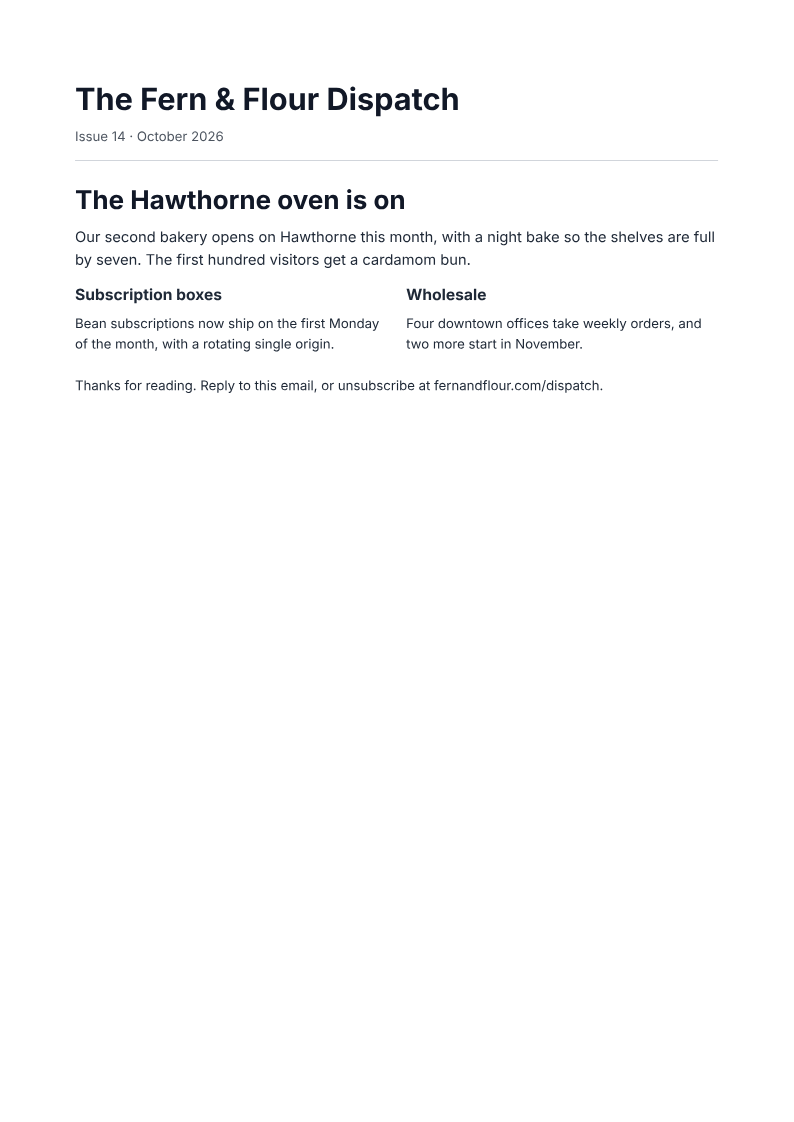
Like it? Open a copy in the studio and change anything by chatting. Free, no watermark.
Build my newsletterYou type it, it sets it
Every part of the document is something you can ask for in a sentence. This is a real edit, made on the example above.
The same paragraph, set off under the headline.
Questions, answered
Newsletter or email campaign?
A newsletter is a recurring issue with several items; a campaign is a one-off email about a single thing. This layout is the issue itself, whether you print it or attach it; the sending tool is a separate step.
How do I make a newsletter?
Give the agent the news, the issue number and the date, and it lays out a printable A4 issue with a masthead, a lead story, short items in columns and a sign-off. Edit any item by chatting.
Can I use it for email?
It produces a PDF issue, not an HTML email. Attach it or print it; sending to a list happens in your own email tool.
How many items should an issue have?
One lead story and two or three short items is a comfortable single page. Add items by asking; the columns and the layout adjust.
Is it free?
Free to start, no watermark, unlimited exports, around 20 PDFs a month on the free plan.
Turn the month into an issue
Give the agent the news, the issue number and the date, and check that every link or offer you mention is real.
- Prompt: Create an A4 newsletter. Include a masthead with the name, issue and date, a lead story with a headline, two short items with their own headings, and a sign-off with a contact. Use only the facts I give.
- Check the issue number, the date and any links, and keep the sign-off short.
- The PDF is the issue itself, not a mailing list, a send, or a subscription system.
Writing a lead readers finish
The lead decides whether the rest gets read:
- Lead with the news, not the housekeeping
- One idea per item, with a heading that says what it is
- Keep the sign-off to a line; it is a courtesy, not a section
How long does it take to build the newsletter?
One short chat: describe what you need, check the live preview, download the PDF. You can keep changing it after that.
Can I bring a document I already have?
Yes. Attach up to four files at a time: images up to 5 MB, PDFs up to 10 MB, or text files up to 200 KB (.txt, .md, .csv, .json). For Word (.docx, not .doc), PDF, Markdown, HTML or LaTeX documents up to 10 MB each, choose ‘Import a document’ from the studio’s attachment menu. The agent rebuilds imports as editable blocks; original formatting may change.
Send an issue people read to the end
- A masthead, a lead story, and short items.
- Columns that keep the page scannable.
- Free to start, no watermark.
No credit card.