- Real document blocks
- Tables and headings stay selectable and printable.
- Live A4 preview
- What you see is what the PDF prints.
- Edit by chatting
- Change anything with one sentence.
- Free download
- No watermark, unlimited exports.
PaintPDF produces a structured document skeleton, not legal advice. Have a qualified lawyer review any agreement before you sign or send it.
Everything an agreement needs
The legal recipes are plain, readable skeletons with the parts every agreement needs, never clause-level legal wording dressed up as advice.
Where they usually go wrong
It has to look like you do this for a living.
A Word file shows the seams: floating tables, mismatched type, spacing you fixed twice.
Template sites make you retype the job into their form.
Twelve fields before you see a page, and the result still looks like their template.
One change and the layout falls apart.
Move a line and the table, the headings, and the footer all need re-fixing.
- Numbered sections: purpose, term, confidentiality, payment, termination
- The parties, defined at the top and used consistently
- A signature block with columns for each party
- Bracketed placeholders where the specifics belong
NDA or service agreement: which one
The two shapes answer different questions, and picking the wrong one wastes a review:
An NDA
One or both sides will share confidential information and you want its use restricted, so make it mutual or one-way
A service agreement
A paid piece of work, with scope, fees, timeline, ownership, and how either side can end it
The two often sit together, an NDA protecting the conversation and a service agreement governing the work, rather than one replacing the other
How it works
Describe it
Type what you need in plain language: the client, the line items, the tone. Attach a file if you have one.
Refine by chatting
The agent builds the document with real tables and headings, and you change anything just by asking. A live A4 preview updates as it works.
Download the PDF
Export a print-ready A4 PDF. No watermark on the free plan, and unlimited exports.
Free to start. No watermark.
See a finished legal document
Pick an example and the full PDF renders here in seconds. Download it if you like it, no sign-in needed.
Mutual NDA between a design studio and a client, 2-year term
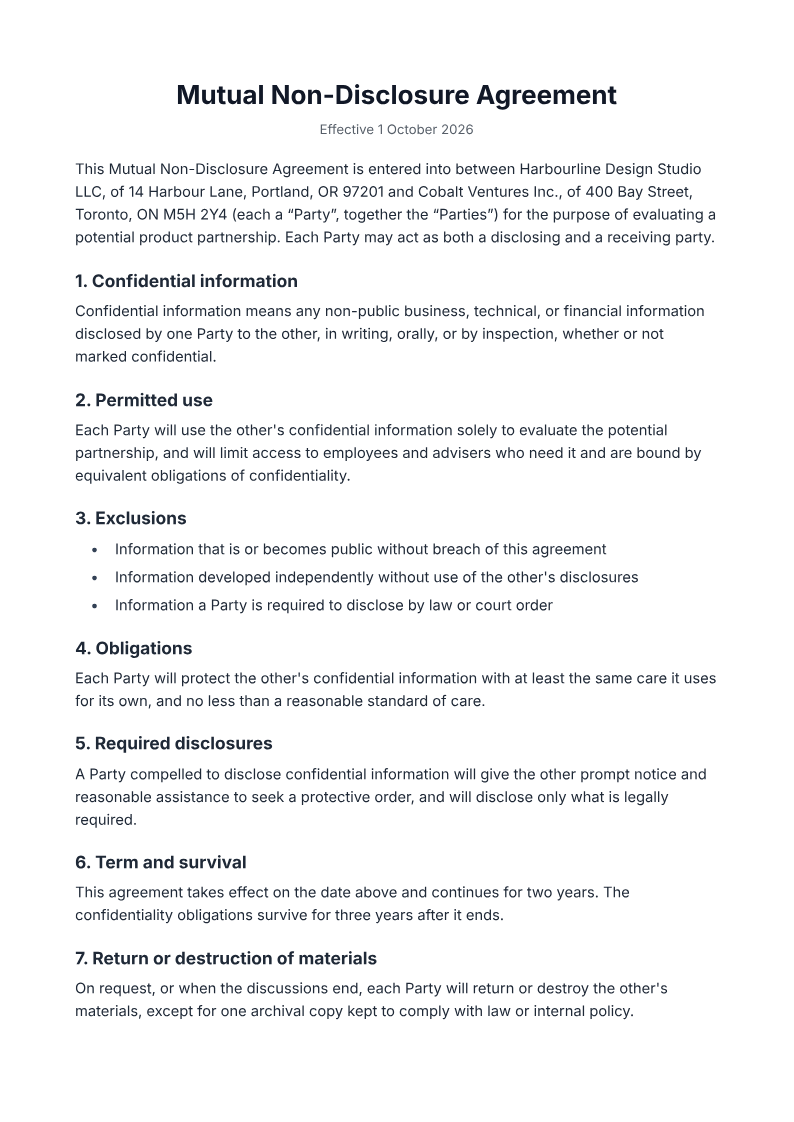
Like it? Open a copy in the studio and change anything by chatting. Free, no watermark.
Draft my documentYou type it, it sets it
Every part of the document is something you can ask for in a sentence. This is a real edit, made on the example above.
A third exclusion in the list under clause 3.
Questions, answered
Do I still need a lawyer to review it?
The point of this page is a clean starting document, not a substitute for counsel. An agreement is only as good as its fit to your situation and jurisdiction, so use the draft to have a faster, better-informed conversation with a lawyer rather than to skip one.
Is this legal advice?
No. It's a formatted starting document with placeholders for your specifics. Nothing here is tailored to your jurisdiction or reviewed by a lawyer, and it shouldn't be treated as legal advice.
What documents can it make?
Right now, mutual NDAs and freelance service agreements, the two shapes that fit ordinary independent work. Both are generic skeletons you fill in.
Are signatures included?
A signature block is, for printing and signing by hand. There's no e-signature service built in; the output is a PDF you print or sign however you already do.
Is it free?
Yes: free to start, no watermark, unlimited exports, around 20 PDFs a month on the free plan.
Review an NDA draft before using it
Supply the parties, purpose, information covered, permitted use, exclusions and proposed duration. Ask qualified counsel to review jurisdiction, enforceability, disclosure obligations and signature requirements. Do not replace professional review with an AI-generated clause or assume a generic skeleton fits your situation.
How long does it take to build the legal document?
One short chat: describe what you need, check the live preview, download the PDF. You can keep changing it after that.
Can I bring a document I already have?
Yes. Attach up to four files at a time: images up to 5 MB, PDFs up to 10 MB, or text files up to 200 KB (.txt, .md, .csv, .json). For Word (.docx, not .doc), PDF, Markdown, HTML or LaTeX documents up to 10 MB each, choose ‘Import a document’ from the studio’s attachment menu. The agent rebuilds imports as editable blocks; original formatting may change.
Start your agreement from a clean skeleton
- Parties, clauses, and signature blocks.
- Placeholders where the specifics belong.
- Free to start, no watermark.
No credit card.