- Real document blocks
- Tables and headings stay selectable and printable.
- Live A4 preview
- What you see is what the PDF prints.
- Edit by chatting
- Change anything with one sentence.
- Free download
- No watermark, unlimited exports.
What is PaintPDF's purchase order generator?
PaintPDF's purchase order generator turns what you are buying into a printable A4 PO: supplier and ship-to blocks, a line-items table with quantity, unit price and amount, a totals stack, and an approval signature. Edit it by chatting. Free to start, no watermark. It also works as a blank PO format sample to fill in.
Get a free purchase order template: pick an example in the live demo and download the PDF, or open it in the studio to make it yours. No sign-in to download, no watermark.
Everything a purchase order needs
A purchase order is the buyer's side of a transaction: what you are ordering, at what price, and where it should go. The layout puts the whole order on one page.
Where they usually go wrong
It has to look like you do this for a living.
A Word file shows the seams: floating tables, mismatched type, spacing you fixed twice.
Template sites make you retype the job into their form.
Twelve fields before you see a page, and the result still looks like their template.
One change and the layout falls apart.
Move a line and the table, the headings, and the footer all need re-fixing.
- Supplier and ship-to blocks, with the delivery address a carrier needs
- A line-items table: item, quantity, unit price, amount
- A totals stack that adds up: subtotal, tax, and shipping
- Payment and delivery terms, and an approval signature
| Subtotal | $4,140.00 |
| Tax (8%) | $331.20 |
| Shipping | $180.00 |
What each field is for
The fields on a PO are the ones that prevent a wrong delivery or a disputed price:
PO number
The reference the supplier quotes on the invoice and packing slip
Ship-to
The delivery address, which can differ from your billing address
Unit price
The agreed price per item, so the invoice can be checked against it
Delivery by
The date you need it, which sets the supplier's expectation
How it works
Describe it
Type what you need in plain language: the client, the line items, the tone. Attach a file if you have one.
Refine by chatting
The agent builds the document with real tables and headings, and you change anything just by asking. A live A4 preview updates as it works.
Download the PDF
Export a print-ready A4 PDF. No watermark on the free plan, and unlimited exports.
Free to start. No watermark.
See a finished purchase order
Pick an example and the full PDF renders here in seconds. Download it if you like it, no sign-in needed.
Purchase order for 12 shelving units, with tax and shipping
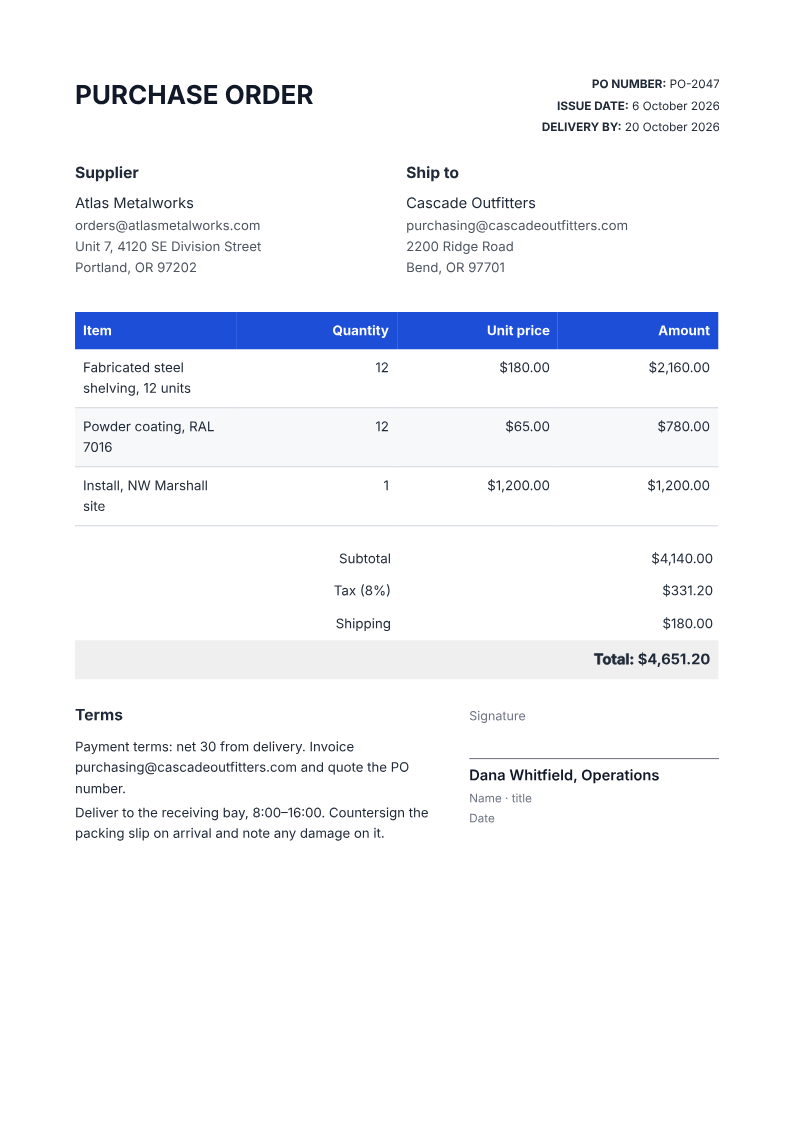
Like it? Open a copy in the studio and change anything by chatting. Free, no watermark.
Create my purchase orderYou type it, it sets it
Every part of the document is something you can ask for in a sentence. This is a real edit, made on the example above.
One more row in the line-items table, with its quantity and price.
| Item | Quantity | Unit price | Amount |
|---|---|---|---|
| Fabricated steel shelving, 12 units | 12 | $180.00 | $2,160.00 |
| Powder coating, RAL 7016 | 12 | $65.00 | $780.00 |
| Install, NW Marshall site | 1 | $1,200.00 | $1,200.00 |
Questions, answered
Purchase order, invoice, or packing slip?
The three documents do different jobs. A purchase order is what you send to buy; an invoice is what the supplier sends to be paid; a packing slip travels with the goods and lists what is in the box. Raise the PO first, then check the delivery against it when the invoice arrives.
How do I create a purchase order?
Describe the supplier, the delivery address, the items and the agreed prices, and the agent lays out a printable A4 PO with a line-items table, totals, terms and an approval line. Check the totals and the delivery date before sending.
What is the difference between a purchase order and an invoice?
A purchase order is what a buyer sends to order goods; an invoice is what the supplier sends to be paid. The PO number is the reference that ties the two together, and usually the packing slip as well.
Can I add tax and shipping?
Yes. The totals stack adds a tax line and a shipping line to the subtotal, and you can ask the agent to change the rate or drop a line.
Can I use it for services, not just goods?
The layout is built for ordered items with quantities and prices. For a service job, a work order or a service agreement fits better; a PO can still record a fixed-price purchase.
Is there a free PO format sample?
Yes. Describe the order and the agent lays out a printable purchase order with supplier and ship-to blocks, a line-items table and totals, which doubles as a blank PO format sample you can fill in.
Is it free?
Free to start, no watermark, unlimited exports, around 20 PDFs a month on the free plan.
Is a purchase order a contract?
A PO records what you intend to buy at the price you agreed; it is not a full supply contract and does not set warranty, liability or dispute terms. For anything beyond a routine order, keep the signed contract alongside the PO and have the PO reference it.
Raise a PO from your order list
Give the agent the supplier, the delivery address, the items and the agreed prices. Check the totals and the delivery date before you send it, and keep the PO number stable so the invoice and the packing slip can match it.
- Prompt: Create an A4 purchase order using my order list. Include the supplier and ship-to blocks, a line-items table with quantity, unit price and amount, a subtotal / tax / shipping total, my payment and delivery terms, and an approval line. Use only the facts I give and mark anything missing for review.
- Check the quantity, unit price and totals against the quote, and confirm the delivery address before sending.
- The PDF is not a procurement or approval system; keep the PO number in your records so the invoice can be reconciled.
How an invoice works: steps, deposits and taxWhere a purchase order sits in the chainCheck the supplier's invoice against the POList what arrived on a packing slip
How long does it take to build the purchase order?
One short chat: describe what you need, check the live preview, download the PDF. You can keep changing it after that.
Can I bring a document I already have?
Yes. Attach up to four files at a time: images up to 5 MB, PDFs up to 10 MB, or text files up to 200 KB (.txt, .md, .csv, .json). For Word (.docx, not .doc), PDF, Markdown, HTML or LaTeX documents up to 10 MB each, choose ‘Import a document’ from the studio’s attachment menu. The agent rebuilds imports as editable blocks; original formatting may change.
Order it in writing before it ships
- Supplier, ship-to, and every line item.
- Totals that add up, terms that are clear.
- Free to start, no watermark.
No credit card.