- Real document blocks
- Tables and headings stay selectable and printable.
- Live A4 preview
- What you see is what the PDF prints.
- Edit by chatting
- Change anything with one sentence.
- Free download
- No watermark, unlimited exports.
What is PaintPDF's certificate generator?
PaintPDF's certificate maker turns an award into a printable A4 certificate: an award title, the recipient's name, what the certificate recognises, the date and issuer, and two signature blocks for the signatories. Edit it by chatting. Free to start, no watermark.
Get a free certificate template: pick an example in the live demo and download the PDF, or open it in the studio to make it yours. No sign-in to download, no watermark.
Everything a certificate needs
A certificate is read at a glance, so the layout leads with the award and the name and keeps everything else small.
Where they usually go wrong
It has to look like you do this for a living.
A Word file shows the seams: floating tables, mismatched type, spacing you fixed twice.
Template sites make you retype the job into their form.
Twelve fields before you see a page, and the result still looks like their template.
One change and the layout falls apart.
Move a line and the table, the headings, and the footer all need re-fixing.
- The award title, so the certificate says what it is for
- The recipient's name, the largest element on the page
- What it recognises: the course, event or achievement
- The date and issuer, with a signature line for each signatory
What each field is for
The fields that make a certificate checkable:
Title
The award's name, kept short so it reads at a glance
Recipient
The full name, spelled the way the person writes it
Achievement
The course or event, and what was completed
Issuer
Who is awarding it, and the date, so it can be verified
How it works
Describe it
Type what you need in plain language: the client, the line items, the tone. Attach a file if you have one.
Refine by chatting
The agent builds the document with real tables and headings, and you change anything just by asking. A live A4 preview updates as it works.
Download the PDF
Export a print-ready A4 PDF. No watermark on the free plan, and unlimited exports.
Free to start. No watermark.
See a finished certificate
Pick an example and the full PDF renders here in seconds. Download it if you like it, no sign-in needed.
Course completion certificate with two signatures
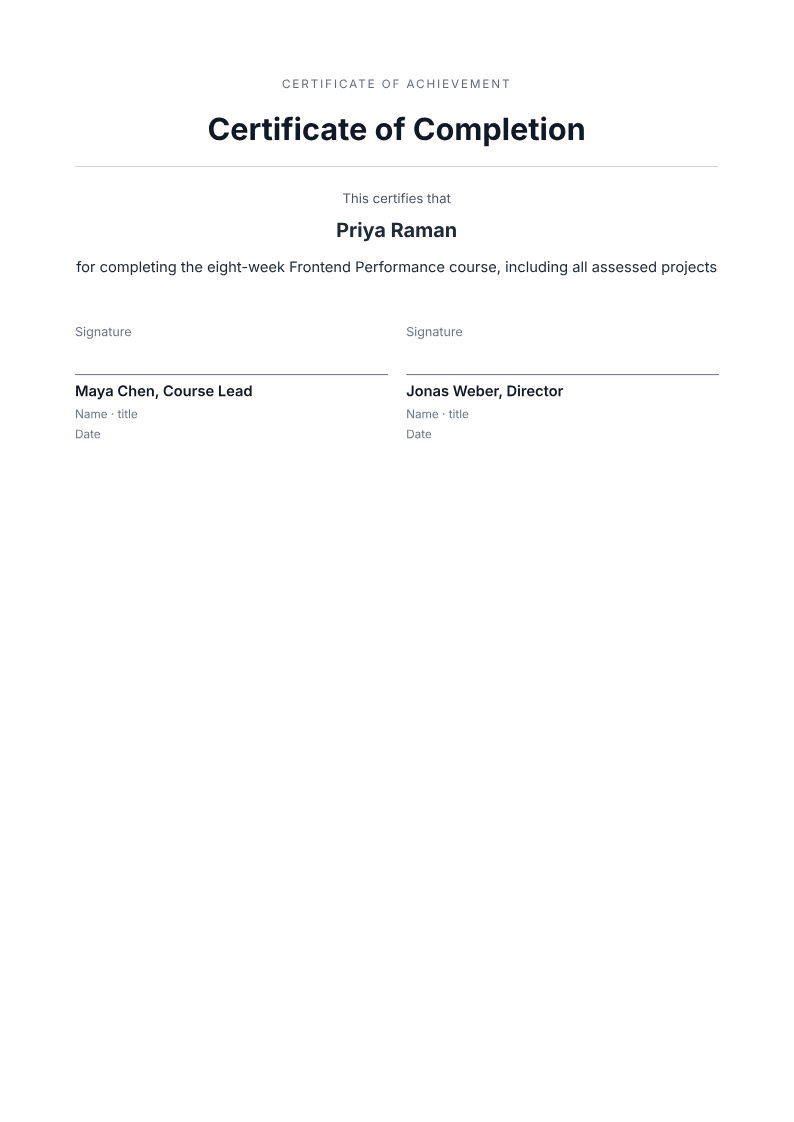
Like it? Open a copy in the studio and change anything by chatting. Free, no watermark.
Make my certificateYou type it, it sets it
Every part of the document is something you can ask for in a sentence. This is a real edit, made on the example above.
The same line, set off under the name.
Questions, answered
Certificate or award letter?
A certificate is the printable record you hand over; an award letter explains the decision in words. Use a certificate for completion, attendance or a prize, and a business letter when the award needs a paragraph of context.
How do I make a certificate?
Describe the award, the recipient and the signatories, and the agent lays out a printable A4 certificate with the title, the name, what it recognises, the date and two signature lines. Edit any part by chatting.
Can I add a logo or a border?
A logo is an image block and needs a JPEG or PNG URL. The layout is centred with a divider; ask the agent for a border or a different accent colour and it updates in place.
Can I make certificates for a whole class?
Yes, but one at a time: each certificate is its own document, so the recipient's name is correct on every one. Reuse the layout and change the name each time.
Is it free?
Free to start, no watermark, unlimited exports, around 20 PDFs a month on the free plan.
Turn the details into a certificate
Give the agent the award, the recipient and the signatories, and check the spelling of the name and the date before you print.
- Prompt: Create an A4 certificate. Include the award title, the recipient's full name, what the certificate recognises, the date and the issuer, and two signature blocks. Use only the details I give and mark anything missing.
- Check the recipient's name and the date before printing; a misspelled name is the one error people remember.
- The PDF is a printable certificate, not a verifiable credential, a digital badge, or a certificate authority.
Printing a certificate
A few practical choices make the printed award look the part:
- A4, portrait, is the default for most awards
- Heavier paper, around 120–160 gsm, makes a certificate feel like one
- One document per recipient, so each name is spelled correctly
How long does it take to build the certificate?
One short chat: describe what you need, check the live preview, download the PDF. You can keep changing it after that.
Can I bring a document I already have?
Yes. Attach up to four files at a time: images up to 5 MB, PDFs up to 10 MB, or text files up to 200 KB (.txt, .md, .csv, .json). For Word (.docx, not .doc), PDF, Markdown, HTML or LaTeX documents up to 10 MB each, choose ‘Import a document’ from the studio’s attachment menu. The agent rebuilds imports as editable blocks; original formatting may change.
Hand over something worth framing
- The award, the name, and what it recognises.
- Signature lines for each signatory.
- Free to start, no watermark.
No credit card.