- Real document blocks
- Tables and headings stay selectable and printable.
- Live A4 preview
- What you see is what the PDF prints.
- Edit by chatting
- Change anything with one sentence.
- Free download
- No watermark, unlimited exports.
PaintPDF produces a structured document skeleton, not legal advice. Have a qualified lawyer review any contract before you sign or send it.
What is PaintPDF's contract generator?
PaintPDF's contract generator turns a description of an engagement into a printable A4 services contract: the parties, the scope, a milestone payment schedule, term and termination, independent-contractor status, intellectual property, confidentiality, warranties and signature blocks, with placeholders where the specifics belong. Edit it by chatting. It produces a structured skeleton, not legal advice; free to start, no watermark.
Get a free contract template: pick an example in the live demo and download the PDF, or open it in the studio to make it yours. No sign-in to download, no watermark.
What a services contract covers
A services contract sets out what will be done, what it costs, and what happens if the relationship ends. The layout keeps the parts a reviewer checks in order.
Where they usually go wrong
It has to look like you do this for a living.
A Word file shows the seams: floating tables, mismatched type, spacing you fixed twice.
Template sites make you retype the job into their form.
Twelve fields before you see a page, and the result still looks like their template.
One change and the layout falls apart.
Move a line and the table, the headings, and the footer all need re-fixing.
- The parties and the engagement
- The scope, pointing to a statement of work for the detail
- A milestone payment schedule with amounts and dates
- Ownership, confidentiality, liability and termination
| Milestone | Amount | Due |
|---|---|---|
| Design and build | $5,100 | 15 November 2026 |
| Launch and handover | $3,400 | 6 December 2026 |
What each section is for
The clauses a reviewer looks for first:
Scope
What is delivered, and where the statement of work takes over
Fees and payment
The milestones, amounts and due dates
Intellectual property
Who owns the work, and when it transfers
Term and termination
The notice period and what is payable for work done
Liability
Any cap, and who indemnifies whom
How it works
Describe it
Type what you need in plain language: the client, the line items, the tone. Attach a file if you have one.
Refine by chatting
The agent builds the document with real tables and headings, and you change anything just by asking. A live A4 preview updates as it works.
Download the PDF
Export a print-ready A4 PDF. No watermark on the free plan, and unlimited exports.
Free to start. No watermark.
See a finished contract
Pick an example and the full PDF renders here in seconds. Download it if you like it, no sign-in needed.
Services contract for a website build with milestone payments
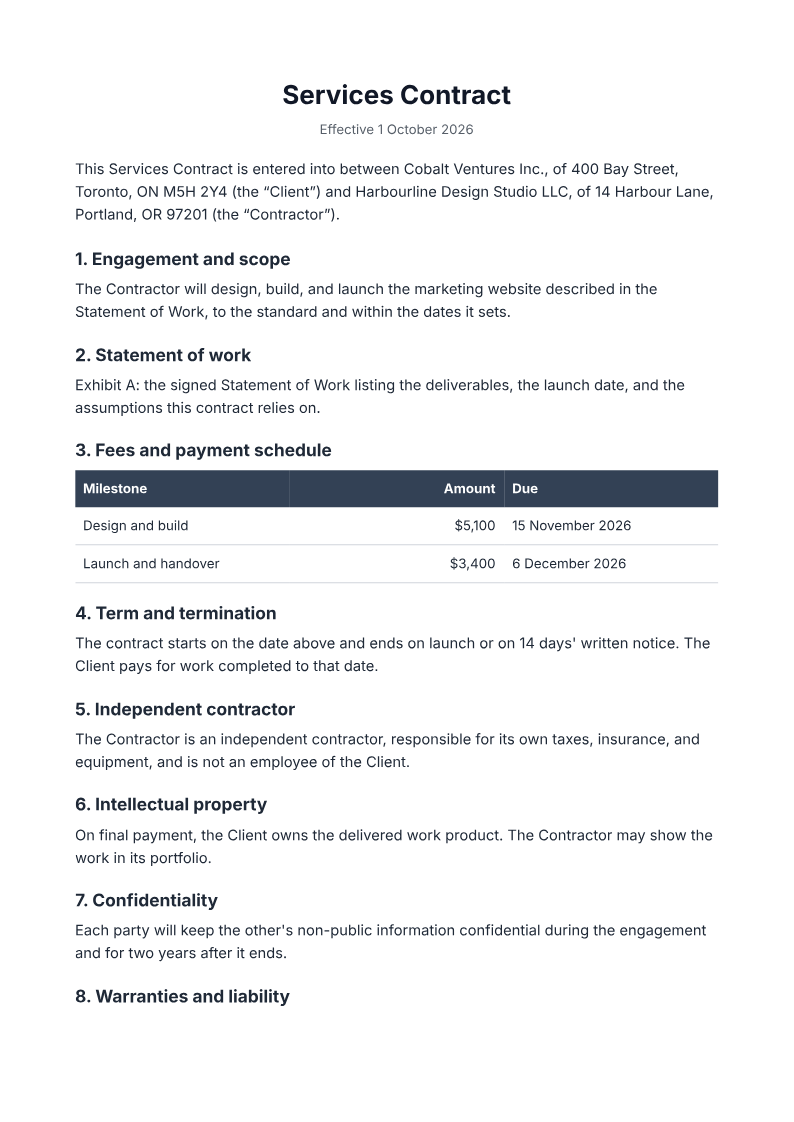
Like it? Open a copy in the studio and change anything by chatting. Free, no watermark.
Draft my contractYou type it, it sets it
Every part of the document is something you can ask for in a sentence. This is a real edit, made on the example above.
A second payment row with its own amount and date.
| Milestone | Amount | Due |
|---|---|---|
| Design and build | $5,100 | 15 November 2026 |
| Launch and handover | $3,400 | 6 December 2026 |
Questions, answered
Contract, NDA, or proposal?
A proposal wins the work; a contract governs it once it is agreed; an NDA protects the information shared around it. They travel together: pitch with the proposal, agree the contract, protect the conversation with an NDA.
How do I create a contract?
Describe the parties, the scope and the payment milestones, and the agent drafts a formatted A4 services contract with numbered clauses, a milestone payment table and signature blocks. Have a qualified lawyer review it before you sign.
Is this legal advice?
No. It is a formatted starting document with placeholders for your specifics, not tailored to your jurisdiction and not reviewed by a lawyer. Treat it as a draft for review, not legal advice.
Contract or service agreement?
They overlap. A services contract typically pairs a milestone payment schedule with a statement of work, while the service-agreement recipe leans on deliverables, revisions and expenses. Pick the one that matches how you bill.
Are signatures included?
A signature block is, for printing and signing by hand. There is no e-signature service built in; the output is a PDF you print or sign however you already do.
Is it free?
Free to start, no watermark, unlimited exports, around 20 PDFs a month on the free plan.
Fixed price or milestones?
Choose the payment shape before you draft, because it changes the schedule:
- Fixed price: one amount, typically split across milestones
- Time and materials: rates and an estimate, billed as the work proceeds
- Retainer: a recurring amount for an ongoing commitment
- This recipe prints a milestone schedule; ask the agent to change the columns if your deal is hourly
Review a contract draft before you use it
Supply the parties, the scope, the milestones and amounts, the term and the governing law. Ask qualified counsel to review the clauses, jurisdiction and signature requirements before you sign.
- Prompt: Draft a services contract from my details. Include the parties, the engagement and scope, a statement-of-work reference, a milestone payment schedule, term and termination, independent-contractor status, intellectual property, confidentiality, warranties and liability, and governing law, with signature blocks. Use only the facts I give and mark anything missing.
- Have a qualified lawyer review the clauses, jurisdiction and signature requirements before you sign or send it.
- PaintPDF produces a structured skeleton, not legal advice, and does not verify signatures or enforceability.
How long does it take to build the contract?
One short chat: describe what you need, check the live preview, download the PDF. You can keep changing it after that.
Can I bring a document I already have?
Yes. Attach up to four files at a time: images up to 5 MB, PDFs up to 10 MB, or text files up to 200 KB (.txt, .md, .csv, .json). For Word (.docx, not .doc), PDF, Markdown, HTML or LaTeX documents up to 10 MB each, choose ‘Import a document’ from the studio’s attachment menu. The agent rebuilds imports as editable blocks; original formatting may change.
Put the engagement in writing
- Parties, scope, and a milestone payment table.
- Placeholders where the specifics belong.
- Free to start, no watermark.
No credit card.