- Real document blocks
- Tables and headings stay selectable and printable.
- Live A4 preview
- What you see is what the PDF prints.
- Edit by chatting
- Change anything with one sentence.
- Free download
- No watermark, unlimited exports.
What is PaintPDF's estimate generator?
PaintPDF's estimate generator turns a job into a printable A4 quote: a scope line, a line-items table with rates, a totals stack, an exclusions note and a valid-until date, so the customer knows what is and is not included. It fits a construction or contractor estimate as well as a general job quote. Edit it by chatting. Free to start, no watermark.
Get a free estimate template: pick an example in the live demo and download the PDF, or open it in the studio to make it yours. No sign-in to download, no watermark.
Everything an estimate needs
An estimate sets an expectation the customer can accept or query. The layout makes the scope, the money and the limits explicit.
Where they usually go wrong
It has to look like you do this for a living.
A Word file shows the seams: floating tables, mismatched type, spacing you fixed twice.
Template sites make you retype the job into their form.
Twelve fields before you see a page, and the result still looks like their template.
One change and the layout falls apart.
Move a line and the table, the headings, and the footer all need re-fixing.
- From and Prepared for blocks, so the quote names both sides
- A line-items table with quantity, rate and amount
- A totals stack ending in an estimated total
- An exclusions line and a valid-until date
| Subtotal | $10,150.00 |
Estimates for construction and contractor work
Most estimate searches come from trades and contractors, so the layout is built for that job: a builder pricing a refit, an electrician quoting a rewire, or a crew costing a garden. The same page serves a general job estimate; the wording adapts to your trade.
A contractor estimate or quote for a defined scope, with a valid-until date
A construction estimate template in PDF, with a priced line-items table
A free estimate form for site work, with the exclusions stated
A quote the customer can accept in writing, not a fixed contract
For a larger pitch, use a client proposalOnce the quote is accepted, raise a work order
How it works
Describe it
Type what you need in plain language: the client, the line items, the tone. Attach a file if you have one.
Refine by chatting
The agent builds the document with real tables and headings, and you change anything just by asking. A live A4 preview updates as it works.
Download the PDF
Export a print-ready A4 PDF. No watermark on the free plan, and unlimited exports.
Free to start. No watermark.
See a finished estimate
Pick an example and the full PDF renders here in seconds. Download it if you like it, no sign-in needed.
Kitchen refit estimate with exclusions and a valid-until date
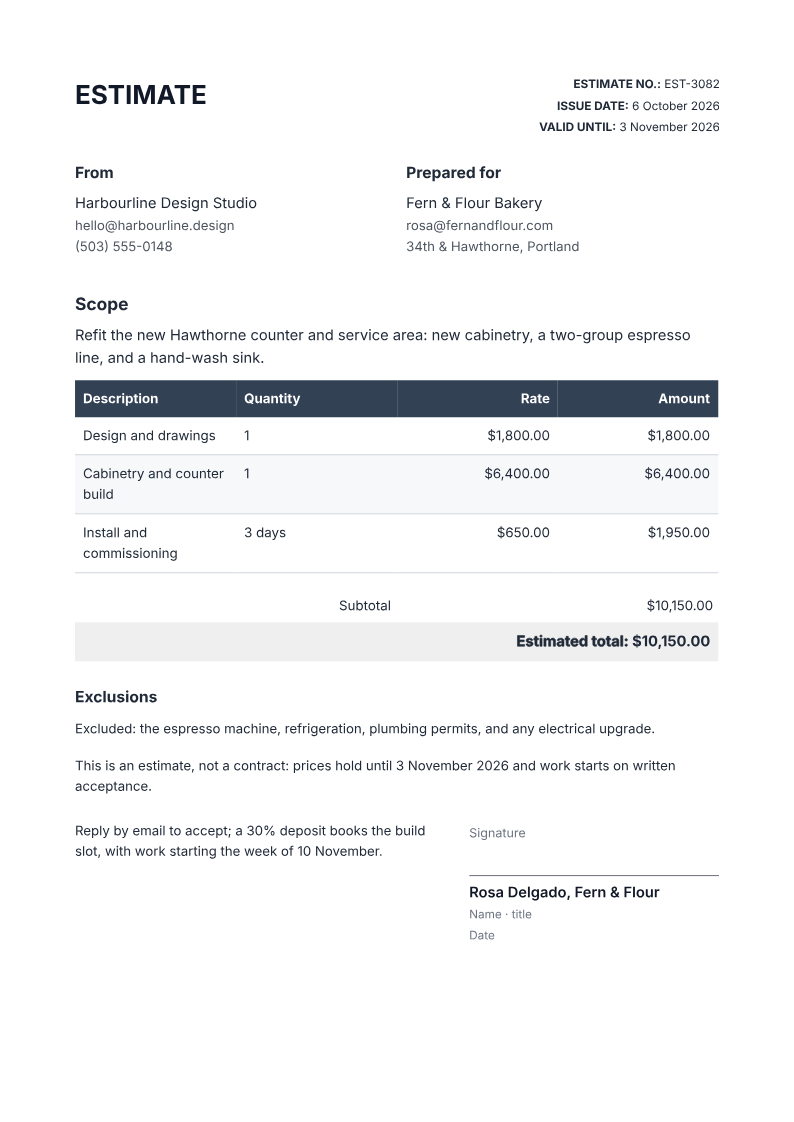
Like it? Open a copy in the studio and change anything by chatting. Free, no watermark.
Create my estimateYou type it, it sets it
Every part of the document is something you can ask for in a sentence. This is a real edit, made on the example above.
One more row in the line-items table, with its rate and amount.
| Description | Quantity | Rate | Amount |
|---|---|---|---|
| Design and drawings | 1 | $1,800.00 | $1,800.00 |
| Cabinetry and counter build | 1 | $6,400.00 | $6,400.00 |
| Install and commissioning | 3 days | $650.00 | $1,950.00 |
Questions, answered
Estimate, quote, or proposal?
A quote and an estimate both put a price on a job; a proposal usually argues for the work as well. This layout is the short, priced document you send once the job is agreed, with a note that it is an estimate rather than a fixed contract price.
How do I create an estimate?
Describe the job, the line items and the rates, and the agent lays out a printable A4 estimate with a scope, a priced table, a total, an exclusions line and a valid-until date. Check the totals before you send it.
What is the difference between an estimate and a quote?
In everyday use they are the same document: a priced offer for a job. This layout labels the total as an estimate and states that it is not a contract, so a customer cannot treat a rough figure as a fixed price.
Can I add tax?
Yes. The totals stack includes a tax line, and you can set the rate or remove it. Ask the agent to change it and the total updates in place.
Does it work for hourly work?
The rate column holds an hourly rate and the quantity column holds hours or days, so an hourly estimate totals like any other. State the hours as an estimate, not a cap.
Can I use it as a construction estimate template?
Yes. Describe the construction job, its line items and rates, and the agent lays out a printable A4 construction estimate with a scope, a priced table, a total, exclusions and a valid-until date. It is a free estimate form, not a fixed contract, so state the exclusions clearly.
Is it free?
Free to start, no watermark, unlimited exports, around 20 PDFs a month on the free plan.
What each field is for
The fields that stop a quote turning into an argument:
- Valid until: how long the prices hold, so an old quote cannot be accepted months later
- Exclusions: what is not included, so a low total is not read as covering everything
- Rate: the price per item or per day, so the customer can see how the total was built
- Estimated total: the headline figure, labelled as an estimate
Why put a valid-until date on it?
Materials, labour and availability move, so a price quoted today is not a price for ever. A valid-until date lets you honour the quote for a defined window and re-quote afterwards without renegotiating the whole job.
Turn a job brief into an estimate
Describe the work, the items and the rates, and set how long the prices hold. Check the totals and the exclusions before sending, and make the not-a-contract line visible.
- Prompt: Create an A4 estimate using my job brief. Include From and Prepared for blocks, a scope line, a line-items table with quantity, rate and amount, a subtotal / tax total, an exclusions line, a valid-until date and a not-a-contract note, plus an acceptance line. Use only the facts I give.
- Check the rates and the total against your costing, and confirm what the exclusions list.
- The PDF is not a contract or an e-signature service; accept the work in writing before you start.
How a winning client proposal is structuredWhat happens after the quote is accepted
How long does it take to build the estimate?
One short chat: describe what you need, check the live preview, download the PDF. You can keep changing it after that.
Can I bring a document I already have?
Yes. Attach up to four files at a time: images up to 5 MB, PDFs up to 10 MB, or text files up to 200 KB (.txt, .md, .csv, .json). For Word (.docx, not .doc), PDF, Markdown, HTML or LaTeX documents up to 10 MB each, choose ‘Import a document’ from the studio’s attachment menu. The agent rebuilds imports as editable blocks; original formatting may change.
Send a quote the customer can accept
- Scope, rates, and a total in one place.
- Exclusions and a valid-until date, stated.
- Free to start, no watermark.
No credit card.