Business Proposal Format: The 6 Sections Clients Read
Short answer: A client decides in the first page. The proposals that get accepted put the outcome first, then scope, deliverables, timeline, pricing, and a single next step — in that order. Anything that doesn't help the client say yes is filler.
There's a particular kind of proposal that looks impressive and never closes: fifteen pages of company history, a mission statement, stock photos of the team, and the price buried on page eleven. The client skims it, means to reply, and doesn't.
The fix isn't to write better prose. It's to reorder the document around the decision the client is making.
The six sections clients read, in order
1. The outcome
Lead with what the client gets, stated plainly. Not "about us" — the result. "A rebuilt checkout that cuts mobile drop-off" is a first line; "we are a full-service agency founded in 2014" is not.
2. Scope
What's included, and just as importantly what isn't. Scope creep starts with a proposal that stayed quiet about boundaries. Name the edges.
3. Deliverables
The concrete things you'll hand over, listed as items a client can tick off: a design system, a staging site, a set of documents. Deliverables are the nouns; scope is the boundary around them.
4. Timeline
Milestones with dates, in a table. A client reads a table; a client skips a paragraph. Give each phase a name, a date range, and a milestone they can hold you to.
5. Pricing
A line that totals. A vague "starting at" or a range with no cap reads as a risk the client has to price themselves. Give a number, or give options that each end in a number.
6. Next steps
One clear action to accept — a date to reply by, what happens after, and what you'll send. Decision documents end with a decision, not a thank-you.
What belongs in the pricing table
The pricing table is where proposals are won or lost, and it's usually the least thought-through page. A few rules:
- Every line ends in a number. "Design and build — $7,000." A client should be able to add up the table and reach the total without reading the prose.
- Right-align the amounts. It sounds trivial. It's the difference between a client scanning three figures in a second and re-reading the column twice.
- Say what the money buys at each stage. A payment schedule — 40% on signature, 40% at build sign-off, 20% on launch — turns a scary total into a series of small decisions.
- Put optional extras in their own row. If the client can decline a line without losing the project, say so.
That's the whole pricing section. It doesn't need a page.
Turn the format into the document
Worked client proposal example
For the fictional Cascade Outfitters website brief, the proposal separates included design/build work from excluded photography, paid media and content. Its pricing table totals $7,000 plus $1,500 to $8,500. A 40/40/20 schedule means $3,400 on signature, $3,400 at build sign-off and $1,700 on launch.
The example asks for a reply by September 18 before a September 22 start. Replace these dates and reconcile every milestone with your actual availability. Its conversion goals and past-project results are fictional example copy, not verified evidence or promised outcomes. Use only your own substantiated claims.
The proposal generator creates the PDF draft; it does not provide e-signatures, acceptance tracking or a guaranteed win rate.
Once the structure is clear, the slow part is usually the page — getting the tables to line up, the milestones to sit in a table, and the total to land at the bottom right.
That's the part worth automating. You describe the project — the client, the six-week scope, the price, the milestones — and PaintPDF builds the proposal on A4 with the sections above already in order: an outcome-first header, a deliverables table, a timeline table, and a pricing table. Then you adjust by chatting: split a milestone, swap a fixed fee for a retainer, tighten the summary.
The format is the strategy. The tool just removes the layout work between having the structure and sending it.
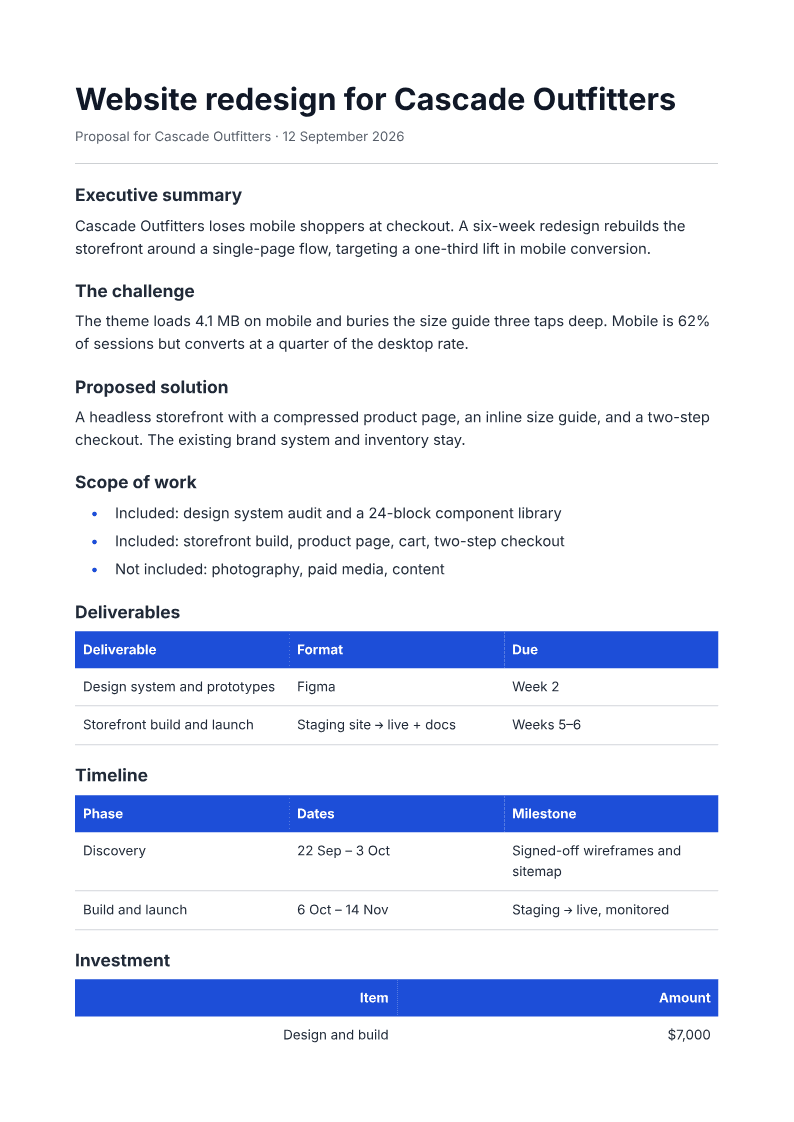
You can start from the proposal generator and let the agent lay the sections out, then change anything by asking.
A note on grant and RFP proposals
Grant funders and procurement teams have their own forms, word limits, and scoring criteria. Use this six-section structure as your drafting skeleton — the logic holds — but expect to reflow it into the funder's format. The proposal you build here is the content; their form is the container.
Frequently asked questions
How long should a proposal be? As long as the decision needs and no longer. For most freelance and small-agency work that's two to four pages. If the client can't find the price in the first minute, it's too long.
Should I include company background? A sentence or two, near the end, if it's relevant — recent similar work, a result you got. The proposal is about the client's project, not your history.
What's the single biggest mistake? Hiding the price. Clients who can't find a number assume the worst and delay. A clear total, even a large one, moves the decision forward.
Can I reuse a proposal template? Yes — that's what a template is for. Keep the six-section structure and swap the scope, milestones, and numbers. Rebuilding the layout each time is the waste, not reusing the format.
Describe the project and PaintPDF builds a client-ready proposal PDF — scope, deliverables, timeline, and pricing tables. Free, no watermark.
Open the proposal generator