Sign-in sheet templates
Sign-In Sheet Template
Set the date, the event and the columns once, then print a sheet your visitors can sign. Keep the file as a template and change only the date next time.
Fill and download without an account. Use AI chat in the studio when you need more.
- Real document blocks
- Tables and headings stay selectable and printable.
- Live A4 preview
- What you see is what the PDF prints.
- Edit by chatting
- Change anything with one sentence.
- Free download
- No watermark, unlimited exports.
What is PaintPDF's sign-in sheet generator?
PaintPDF's sign-in sheet template lets you set the event, date and columns, print a sheet with blank rows, and keep the file so next time you change only the date. It is a printable A4 PDF, not a visitor management system.
Get a free sign-in sheet template: fill the form or pick an example in the live demo, then download the PDF or open it in the studio to make it yours. No sign-in to download, no watermark.
What a sign-in sheet needs
A visitor sheet has one job: record who was on site, when, and who was expecting them. Keep the columns short enough to fill in at a front desk.
Where they usually go wrong
It has to look like you do this for a living.
A Word file shows the seams: floating tables, mismatched type, spacing you fixed twice.
Template sites make you retype the job into their form.
Twelve fields before you see a page, and the result still looks like their template.
One change and the layout falls apart.
Move a line and the table, the headings, and the footer all need re-fixing.
- Name and a contact number or email
- Time in and time out
- Host, purpose or the person the visitor came to see
- A consent line and a note on how long the sheet is kept
How it works
Choose a template
Preview a ready-made layout and choose the one that fits your document.
Enter your details
Fill the template's fields and watch the PDF preview update. Required values are flagged and defined totals are calculated for you.
Download or customize
Download your PDF, or continue in the app to customize it in chat and save a reusable template. Your details come with you.
Free to start. No watermark.
Fill a sign-in sheet template in your browser
Type your details into the form and the real A4 page updates as you type. Download it now, or open it in the studio and save it as a template you can refill next month. No upload, no design software.
Start from a fillable template
Opening your template…
You type it, it sets it
Every part of the document is something you can ask for in a sentence. This is a real edit, made on the example above.
One more line in the sign-in table, with a time in and out.
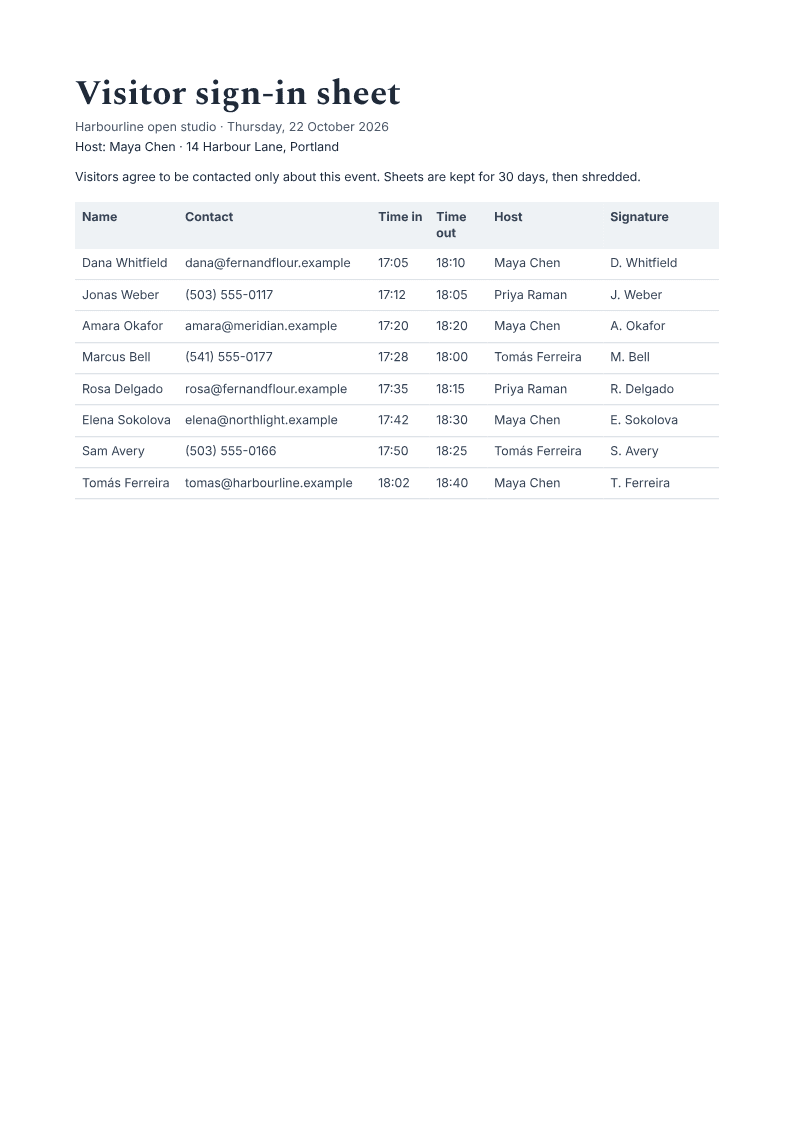
Name | Contact | Time in | Time out | Host | Signature |
|---|---|---|---|---|---|
Dana Whitfield | dana@fernandflour.example | 17:05 | 18:10 | Maya Chen | D. Whitfield |
Jonas Weber | (503) 555-0117 | 17:12 | 18:05 | Priya Raman | J. Weber |
Questions, answered
Visitor sign-in sheet template: what to put in the columns
The visitor sign-in sheet template on this page uses six columns: name, contact, time in, time out, host and signature. Six is enough for most front desks. If you will never call a visitor, drop the contact column; if a visitor may be on site for hours, keep both times. The blank rows are meant to be completed by hand after you print the page.
Set the event schedule firstKeep a front-desk opening checklistSee all fillable templates
What is a visitor sign-in sheet template?
A visitor sign-in sheet template is a printable page with fixed columns and blank rows. You set the event, date and host, print it, and visitors write their name, contact, time in and out, host and signature at the door. This page produces that A4 PDF.
Do I need an account to print one?
No. Fill the form and download the PDF without signing in. An account is only needed if you want to open the same document in the studio and keep it there.
Can I use this for attendance?
It can record who arrived, but it is not an attendance register. A class or shift attendance sheet usually needs a roster, a status per person and a summary. Use the sign-in sheet at the door and keep attendance in the system that owns it.
How long should I keep completed sheets?
Decide before you print, then state it on the sheet. A one-day event may need the sheet only long enough to follow up, while a site with health and safety obligations may need it longer. Check your own policy and local rules.
Is it free?
Yes. The template downloads without a watermark or an account. The free plan has unlimited exports, and opening your own document in the studio uses the normal free allowance.
One sheet per page or a compact grid
A front desk with a handful of visitors can use one sheet per page, with generous rows and room for a signature. A whole morning of visitors needs a compact grid with more rows and smaller type. The table on this page holds eight rows; print a second copy when the day runs longer.
Visitor sign-in versus attendance
A visitor sign-in sheet records who was on site and who was expecting them. An attendance sheet records who was present in a class, a shift or a session, and often feeds a register. Use the sign-in sheet at the door and keep attendance in the system that already owns it.
Collect less
Do not ask for a passport number, a home address or a date of birth unless you will use it and can store it safely. Say on the sheet how long it is kept, then actually dispose of it on that date. A shorter sheet is easier to complete and easier to defend.
How long does it take to build the sign-in sheet?
One short chat: describe what you need, check the live preview, download the PDF. You can keep changing it after that.
Can I bring a document I already have?
Yes. Attach up to four files at a time: images up to 5 MB, PDFs up to 10 MB, or text files up to 200 KB (.txt, .md, .csv, .json). For Word (.docx, not .doc), PDF, Markdown, HTML or LaTeX documents up to 10 MB each, choose ‘Import into this document’ from the studio’s attachment menu. The agent rebuilds imports as editable blocks; original formatting may change.
Print the sheet before the first visitor arrives
- Date, host and columns set once.
- Blank rows for visitors to sign by hand.
- Free to start, no watermark.
No credit card.