How to Write Meeting Minutes (Template and Example)
Meeting minutes are the record of what a meeting decided and who owns the next step. Write them while the meeting runs, or within the hour, because the detail that matters (who agreed to what, and by when) fades fast. Two accurate pages beat six pages of discussion nobody rereads.
Disclosure: we build PaintPDF, and the example below is a real render of the minutes layout in our generator. You can run the same process on paper.
What meeting minutes have to contain
Minutes answer two questions for a reader who was not there: what changed, and who does what next. Six parts carry that:
The order is not decoration. A reader scans the header, jumps to the decisions, then checks their own row in the action table. Anything that interrupts that scan belongs lower down the page.
Write each decision in the past tense and name the actor: "Approved the Q4 hiring plan", "Moved the launch to 30 November", "Rejected the second supplier". A line like "we talked about the budget" is a discussion note under the wrong heading. If the meeting recorded a dissent, note it in one line beneath the decision, because the record has to survive a reader who was in the room.
How to write meeting minutes in five steps
- Set the page before the meeting starts. Write the header, the attendee list and the agenda topics first. You then add content during the meeting, not structure.
- Number decisions as they happen. When the room agrees on something, write it in one sentence and read it back. "Approved the Q4 hiring plan: one senior designer, start by January, Maya owns it."
- Fill the action table in the room. Every task gets a row, an owner and a date before people leave. If the owner or the date is unknown, write that down and ask.
- Keep discussion to one bullet per topic. Name the topic and the outcome. "Capacity: booked through mid-November, so no fixed-fee work starts before December" is enough.
- Read the actions aloud at the end, then send the minutes the same day. The read-back catches an owner who did not agree, and the same-day send catches a decision everyone misremembered.
Step 3 is the one people skip. An action item with no owner is a wish, and a due date of "soon" cannot be checked.
Rough notes are fine as input, as long as they carry the decision and the owner. "Pricing page, Priya, 24 Oct, agreed" is enough to rebuild the line later. "Pricing chat, long" is not.
What finished minutes look like
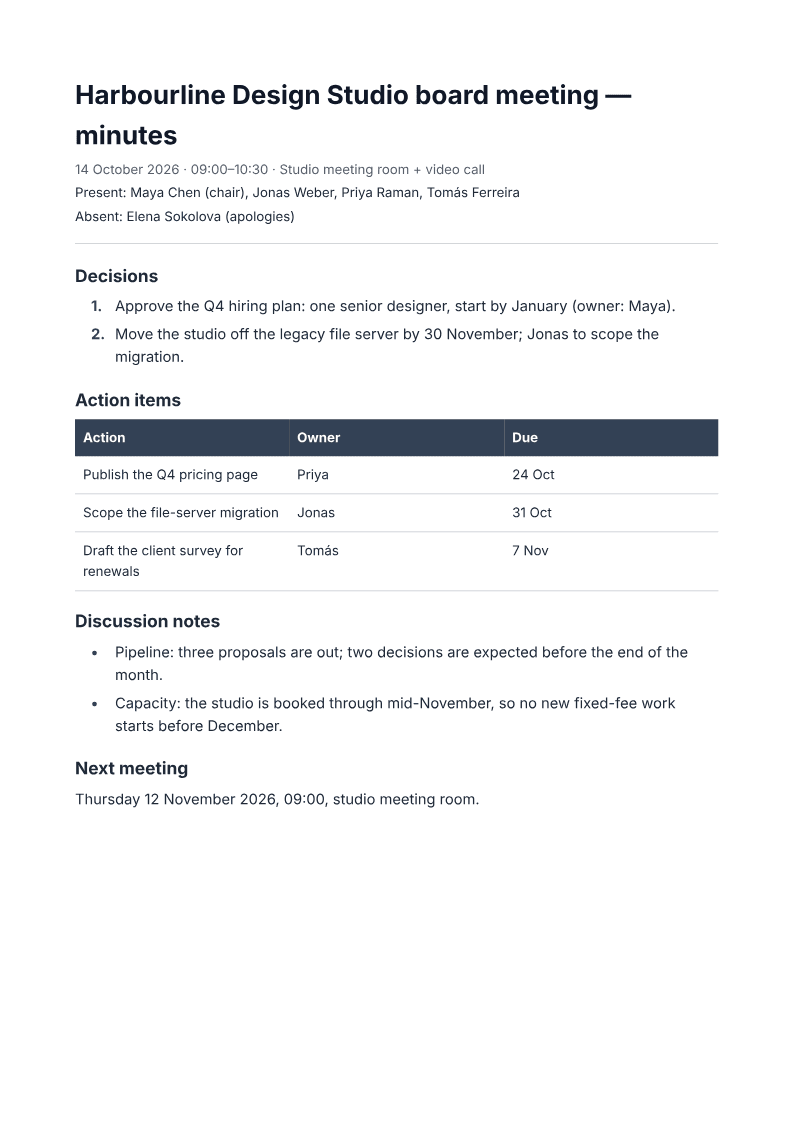
Read the example in the order a colleague would. The header names the meeting and the time. Attendance marks who sent apologies. The two decisions are numbered and short. The action table gives three tasks, each with an owner and a date. Discussion notes take two bullets, and the next meeting is fixed at the bottom.
Nothing in it is clever. That is the point: a reader finds their own row in about five seconds.
The mistake that turns minutes into a transcript
The common failure is writing down the conversation instead of the outcome. "Priya raised the pricing question and there was a long discussion about tiers" tells a reader nothing they can act on. "Publish the Q4 pricing page, Priya, by 24 October" does.
Here is the same moment written both ways:
Long chat about the file server. Jonas thinks November is tight but doable if we scope it.
Scope the file-server migration by 30 November; Jonas to report the plan at the next meeting.
The second version can be checked in December. The first is a memory of a mood.
Three more habits break the record:
- Decisions buried in paragraphs. If a decision is not on its own numbered line, someone will miss it.
- Actions without dates. "Follow up with the client" cannot be chased. "Send the renewal survey, Tomás, 7 November" can.
- Minutes written from memory two days later. You will remember the argument and forget the date.
What meeting minutes are not
Minutes are not a transcript, and they are not a recording. PaintPDF formats the notes you supply. It does not join the call, record audio or transcribe speech, and there is no Teams, Zoom or Meet integration.
They are also not a legal record on their own. Quorum, voting rules and approval of minutes are your organisation's rules, not the document's. If a board or a regulator needs signed minutes, a printed signature line is a line on a page, not an e-signature.
Minutes are not the place for side comments, jokes, or a blow-by-blow of who said what. Keep those in your own notes, if anywhere.
Fill a meeting minutes template
Describe the meeting, or paste your rough notes into the meeting minutes generator, and ask for attendees, decisions and an action table with owners and dates. Check every name and date against what you heard, then download the A4 PDF.
Set the agenda first with the meeting agenda generator. An agenda gives the minutes their topic order, and one page follows the other. When a meeting needs a shorter brief instead of a full record, turn the notes into a one-pager.
Frequently asked questions
How long should meeting minutes be?
One page for most meetings. A board meeting with several motions may run to two. Length is not the measure; a reader should find the decisions and their own action in under a minute.
Who should take the minutes?
Someone who is not running the meeting. A chair who writes minutes stops listening to the room. Rotate the job, or have the minute taker follow the agenda so the topics arrive in order.
Do meeting minutes need to be approved?
Most organisations approve the previous minutes at the start of the next meeting. That approval is a governance step, not a formatting one, so follow your own rules and record the approval as a decision.
Can I write minutes from rough notes after the meeting?
Yes, if you do it the same day and you wrote down the decisions and owners. Paste the notes and ask for the structure, then check the names and dates yourself.
Describe the meeting and download formatted A4 minutes with decisions, owners and an action table, free to start with no watermark.
Fill my meeting minutes