- Real document blocks
- Tables and headings stay selectable and printable.
- Live A4 preview
- What you see is what the PDF prints.
- Edit by chatting
- Change anything with one sentence.
- Free download
- No watermark, unlimited exports.
Everything minutes need to be useful
Minutes are a record of what was decided and who does what next, not a transcript. The starting layout maps that onto real blocks.
Where they usually go wrong
It has to look like you do this for a living.
A Word file shows the seams: floating tables, mismatched type, spacing you fixed twice.
Template sites make you retype the job into their form.
Twelve fields before you see a page, and the result still looks like their template.
One change and the layout falls apart.
Move a line and the table, the headings, and the footer all need re-fixing.
- A header with the date, time, location, and who was present
- Decisions as a numbered list, with the owner when one was assigned
- An action-items table with owner and due date for every task
- Discussion notes kept short, one bullet per topic
One template, any meeting
The same structure fits the meetings teams run every week; the fields change, not the layout:
Board meetings
Motions, approvals, and follow-ups
Sprint retrospectives
What to change and who owns it
Client calls
Decisions, next steps, and dates
Project standups
Blockers and the actions they need
How it works
Describe it
Type what you need in plain language: the client, the line items, the tone. Attach a file if you have one.
Refine by chatting
The agent builds the document with real tables and headings, and you change anything just by asking. A live A4 preview updates as it works.
Download the PDF
Export a print-ready A4 PDF. No watermark on the free plan, and unlimited exports.
Free to start. No watermark.
See finished meeting minutes
Pick an example and the full PDF renders here in seconds. Download it if you like it, no sign-in needed.
Board meeting minutes with decisions and action items
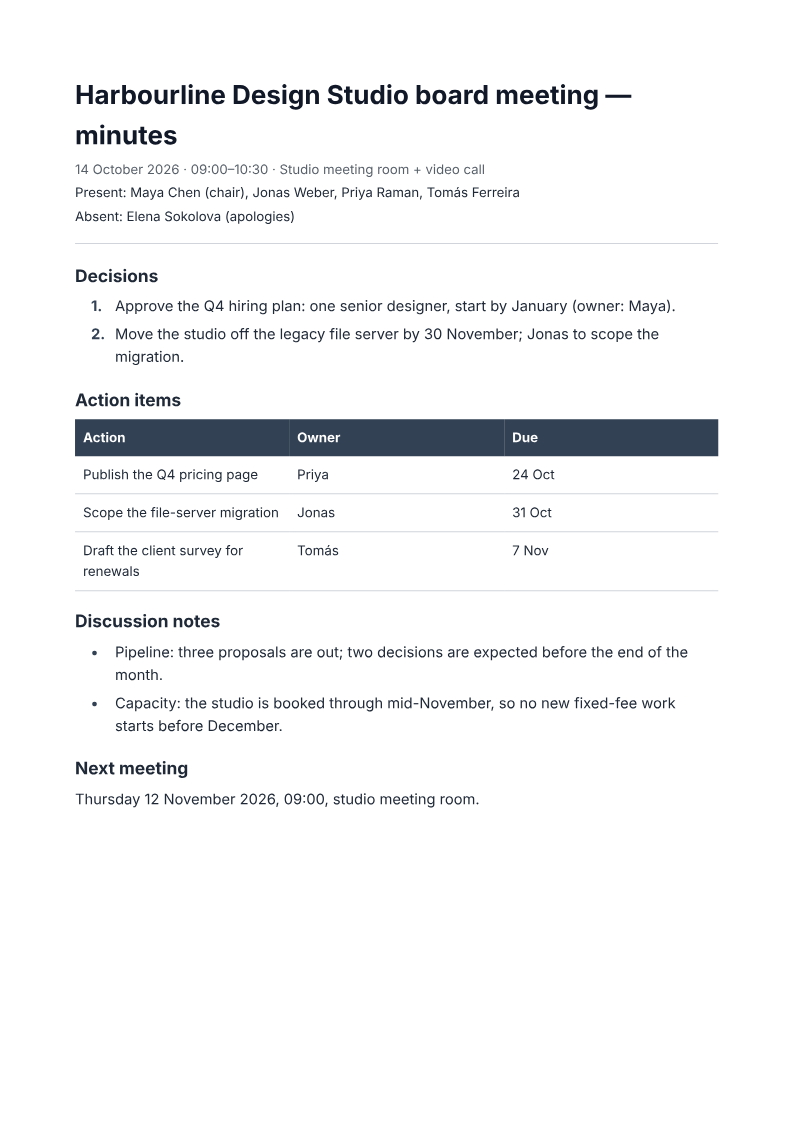
Like it? Open a copy in the studio and change anything by chatting. Free, no watermark.
Write my minutesYou type it, it sets it
Every part of the document is something you can ask for in a sentence. This is a real edit, made on the example above.
One more row in the action table, with its owner and date.
| Action | Owner | Due |
|---|---|---|
| Publish the Q4 pricing page | Priya | 24 Oct |
| Scope the file-server migration | Jonas | 31 Oct |
Questions, answered
Minutes or notes: what belongs in each?
Paste written notes and ask for meeting context, decisions, owners and deadlines. Check names, votes and due dates against the source; missing information should stay unknown. PaintPDF formats the supplied notes, not a live recording or automatic transcript, and provides no Teams integration.
Can it structure my rough notes?
Yes. Paste the notes or describe the meeting and the agent sorts them into attendees, decisions, action items with owners, and discussion notes. You can move or rewrite any line by chatting.
Does it add an action-items table?
Yes: an Action, Owner, Due table is part of the layout, so every task gets its own row instead of being buried in a paragraph.
Is it free?
Free to start, no watermark, unlimited exports, around 20 PDFs a month on the free plan.
Can I use it for board meetings?
The structure covers what board minutes need to record: attendance, decisions with owners, and the follow-ups. Quorum and voting rules are your organisation's business, not the document's.
How long does it take to build the meeting minutes?
One short chat: describe what you need, check the live preview, download the PDF. You can keep changing it after that.
Can I bring a document I already have?
Yes. Attach up to four files at a time: images up to 5 MB, PDFs up to 10 MB, or text files up to 200 KB (.txt, .md, .csv, .json). For Word (.docx, not .doc), PDF, Markdown, HTML or LaTeX documents up to 10 MB each, choose ‘Import a document’ from the studio’s attachment menu. The agent rebuilds imports as editable blocks; original formatting may change.
Minutes people actually read
- Attendees, decisions, and owners.
- Action items in a table, not a paragraph.
- Free to start, no watermark.
No credit card.