Which AI Can Generate a PDF for Free? What to Check Before You Commit
Several AI tools can generate a PDF for free, but "free" means four different things. Before you commit to one, check whether the file carries a watermark, whether the download itself is gated, how many documents the free plan allows, and whether the page is a real A4 with selectable text. A tool can be free on one of those counts and not on the others.
Disclosure: we build PaintPDF. This page is about the checks to run on any tool, and where PaintPDF stands on each one. We have not run a scored comparison of every free AI PDF tool, so treat the checklist as the useful part and our own numbers as ours to state plainly.
The four things "free" hides
1. The watermark
The most common catch: the preview is free, the export is not, and the free export carries a mark. Zoom into the exported file and look at the footer and the corners for a logo, a line of text, or a diagonal label.
2. The download gate
Some tools let you generate and preview without an account, then ask you to sign up, add a card, or pick a plan before the download button works. Test the download on a throwaway document before you put real content in.
3. The usage limit
"Free" often means a monthly allowance: a number of credits, generations, or exports. Find the number, and check what happens at the end of it — a block, a downgrade to watermarked output, or an upgrade prompt mid-task.
4. The page itself
A PDF is not automatically a good page. Check the paper size (A4 or Letter), whether the text is selectable, whether tables keep their columns, and whether content breaks across pages sensibly.
A test you can run in ten minutes
Use one real document, not a demo:
- Generate a one-page invoice with three line items, a subtotal and a tax line.
- Download it and open the file, not the preview.
- Zoom to the footer and the corners and note any watermark.
- Select a line of text and copy it; if you cannot, the page is an image, not text.
- Measure the page: it should be 210 × 297 mm (A4) or 8.5 × 11 in (Letter).
- Correct one field — change a due date — and check that the totals and the rest of the page survived.
A tool that passes those six steps is doing the job. A tool that fails step 2 or step 4 is not free in the way that matters.
Where PaintPDF stands
On the same four counts:
One credit is $0.01 of metered AI usage; a typical one-shot document costs two or three credits, and a long multi-section report can cost around ten. If a month runs out, exports of documents you have already built still work.
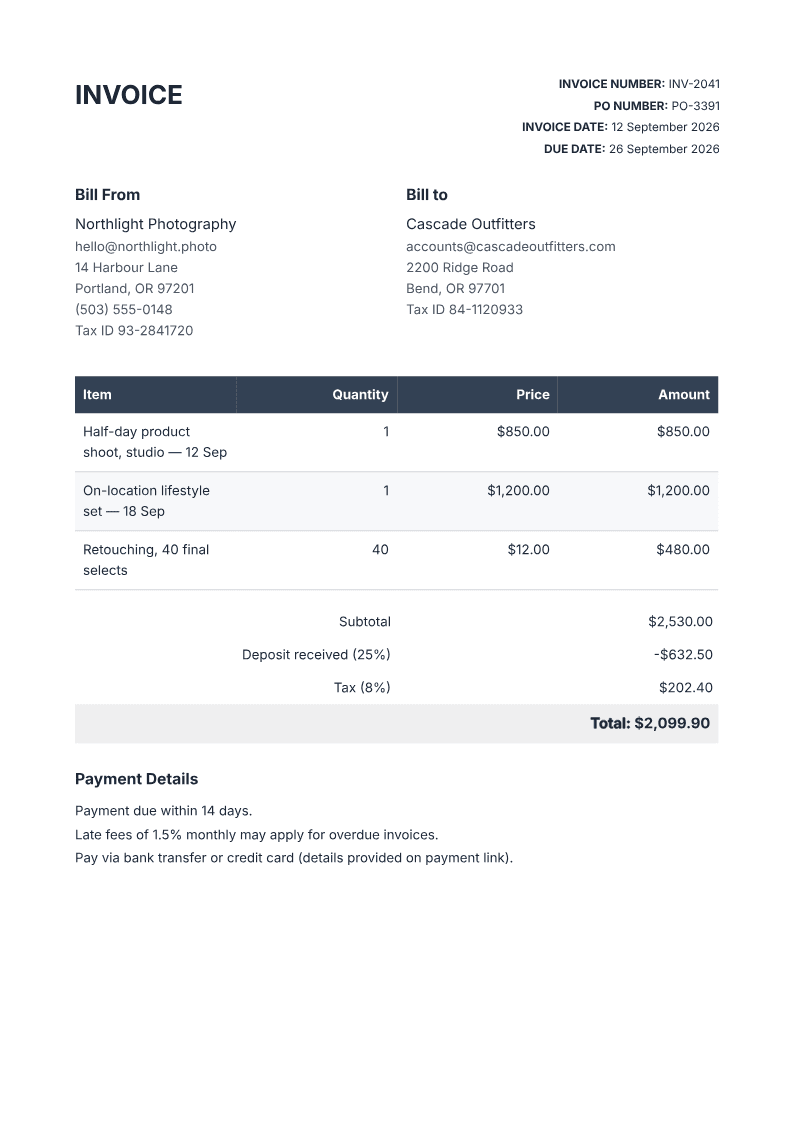
Run the test on the invoice generator, or start from the AI PDF generator hub for other document types. Both examples download without an account.
The checklist, on any tool
- Open the exported file, not the on-screen preview.
- Zoom the footer and corners for a watermark.
- Check the download button works before you sign up.
- Find the plan's number: credits, generations or exports per month.
- Confirm the page size and that the text is selectable.
- Make one correction and check the rest of the document is intact.
Frequently asked questions
Which AI tool generates a PDF for free?
Several do, with different limits. Test the one you are considering with the six steps above: the differences that matter are the watermark, the download gate, the monthly limit, and whether the page is a real, selectable A4.
Is "free" ever really free?
Yes, with a limit. Most free plans cap how much AI usage you get per month, and some add a watermark to free exports. A tool that is free on both counts, with unlimited exports, is the useful kind.
Can I generate a PDF without signing in?
On PaintPDF, the examples on the marketing pages render and download without an account; building your own document in the studio needs one. Many tools gate the download earlier than that.
Are free PDFs A4?
Not always. Some produce Letter, some produce a web page you print yourself, and some export an image of a page rather than selectable text. Check the file, not the preview.
Describe a document, watch it render as an A4 page, then download the PDF. Free to start, no watermark.
Open the AI PDF generator