7 AI PDF Generators in 2026: Features, Examples, and Limits
The right PDF tool depends on the document you need. An invoice needs accurate totals and readable columns. A report needs source fidelity and sensible page breaks. A visual brochure may need much more control over individual graphics.
Disclosure: this article is written by the PaintPDF team. On October 4, 2026, we reviewed the primary product pages linked below and rendered the downloadable PaintPDF fixtures in this article. On October 9, we ran the same invoice brief and revision in PaintPDF and AI Doc Maker, plus a report and revision in PaintPDF. Other tools remain untested. This is a source-backed shortlist with limited first-hand trials, not a tested ranking.
What each tool offers
The external features below are vendor descriptions, not independently verified output results. Plan limits, export access and watermark conditions should be checked in the plan you intend to use.
We cannot fairly score external tools for layout quality, traction or speed from their marketing pages. AI Doc Maker explicitly advertises automatic formatting; Canva and Gamma also offer AI capabilities. Calling them plain-text-only or wholly manual would misstate their products. The limited AI Doc Maker trial below checks one invoice workflow, not its performance on every document type.
PaintPDF: inspect the actual files
We rendered two deterministic fixtures through the same Takumi renderer used by PaintPDF's preview and download. The invoice uses the public photography example. The report uses the public report recipe plus an explicitly authored second-page appendix. No model call or paid plan was involved, so these files verify rendering, not how well an AI follows a prompt.
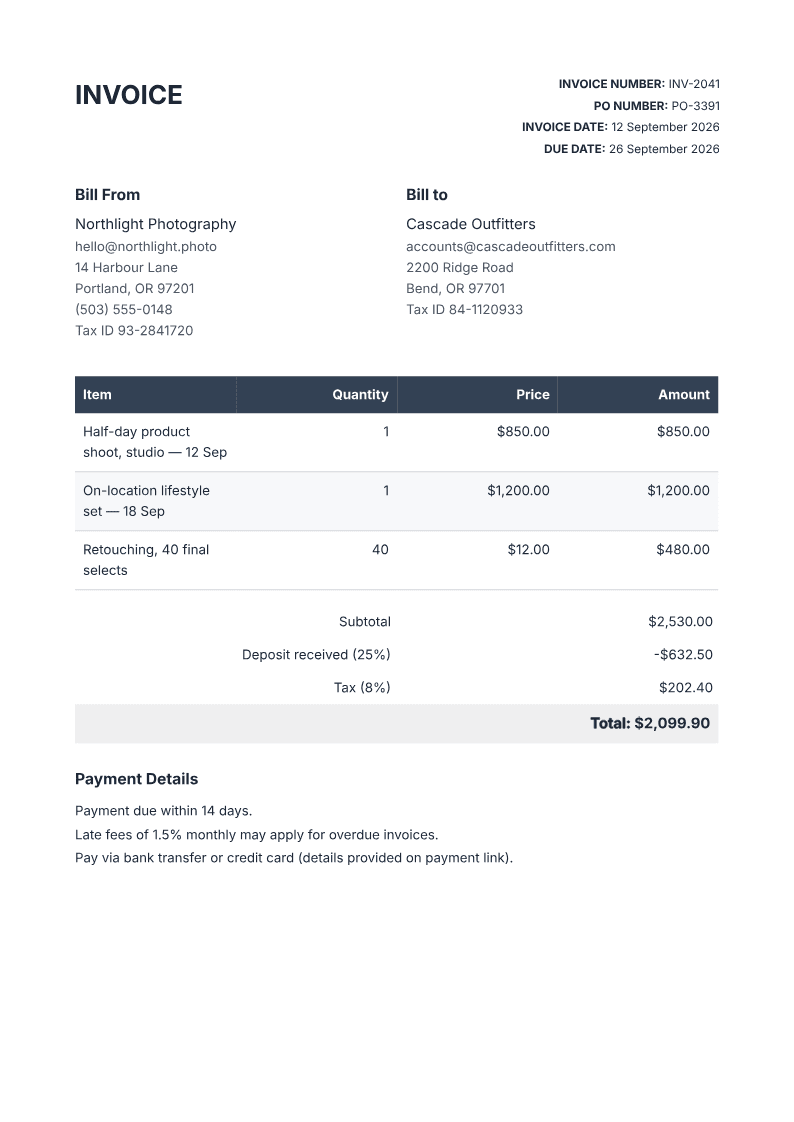
Download the invoice PDF. For your own client, open the invoice generator.
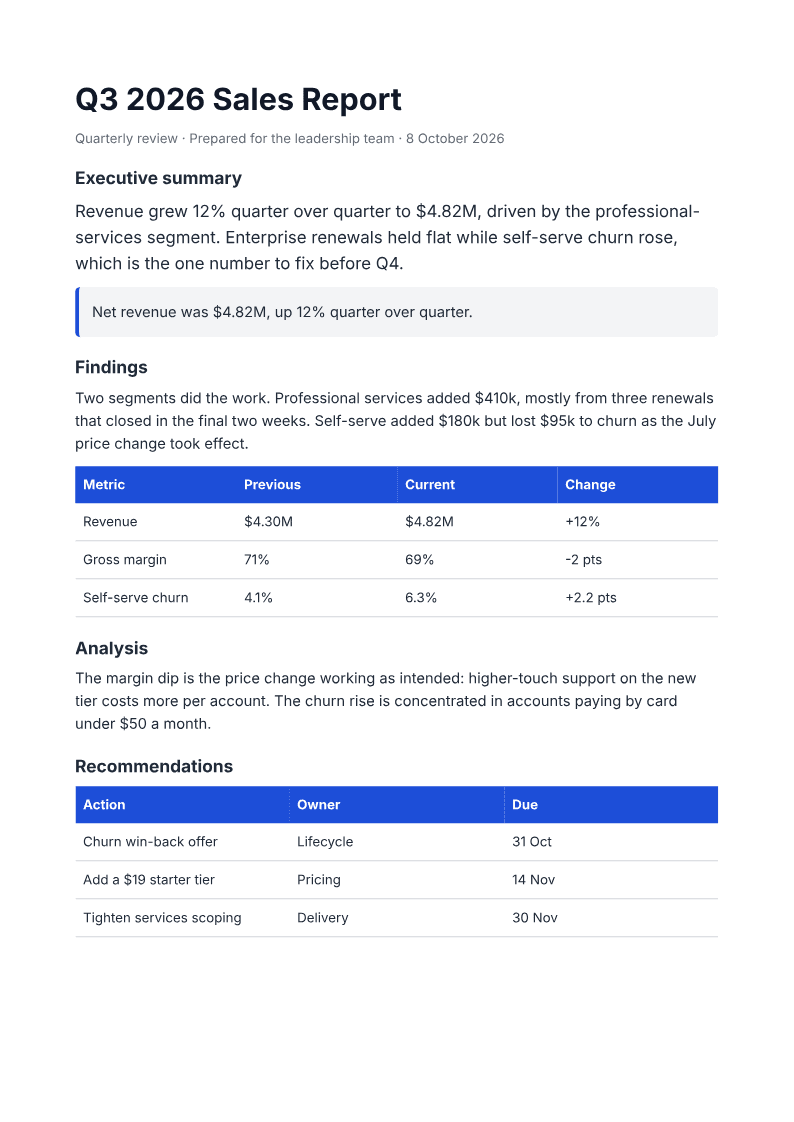
Download the two-page report, the source KPI CSV, or the machine-readable verification record. Open the report generator to build a report from your own numbers. For scope, milestones and pricing, start with the proposal example.
First-hand browser trials: October 9, 2026
These files were generated by AI from fictional inputs, unlike the deterministic fixtures above. PaintPDF used a signed-in Free account with metered credits. AI Doc Maker used an unsigned browser session in Auto mode; we did not log in or buy a plan, and its interface displayed credit usage. The underlying Auto model was not established. Access conditions can change.
Inspect the actual invoice files: PaintPDF first output and revised output; AI Doc Maker first output and revised output. The PaintPDF report also has a first output and revised output. The exact trial prompts and verification record preserve the method, page metadata, file hashes and limitations.
The matched invoice prompt supplied the exact values in the invoice brief below, plus an instruction not to invent addresses, tax IDs, late fees, payment links or extra services. Both tools then received: “Change only the due date to September 28, 2026 and update the payment terms to net-16 so they match the issue date. Preserve every other field, line item, quantity, rate, subtotal, tax, deposit and balance due. Do not add late fees, addresses or payment details.” The report revision changed only the churn-investigation owner to Customer Success.
One successful run is not a reliability score or evidence of a universal winner. We checked PDF dimensions and extracted text, not accessibility certification, every possible layout or long-term free-plan limits. PaintPDF's files also produced a boolean-object warning in Poppler while still allowing text extraction; that warning remains a PDF-validation follow-up.
Try the same two tasks
Use these prompts unchanged in each tool that accepts prompts. In a manual editor, use them as a brief and record the extra setup. These are evaluation inputs, not claims that the fixtures above were AI-generated from them.
Invoice prompt
Create a one-page A4 invoice from Northlight Photography to Cascade
Outfitters in USD. Line items: studio product shoot, 1 x $850;
location shoot, 1 x $1,200; retouching, 40 x $12. Subtotal $2,530.
Deposit already received $632.50 (25% of subtotal). For this fictional
example, calculate 8% tax on the full subtotal: $202.40 tax and
$2,099.90 due after the deposit. Use invoice INV-2041, issued September
12, 2026, due September 26, 2026, with net-14 terms. Show the tax basis,
use selectable text and a readable table, and provide a downloadable PDF.
This tax treatment is an evaluation convention, not tax advice. Check the rules for your jurisdiction. The public invoice fixture uses September 12 as its issue date, September 26 as its due date and 14-day payment terms. Check those fields together in a live trial, then change only the due date to test revision fidelity.
Report prompt
Create a two-page A4 Q3 2026 report for Northwind, prepared for the
leadership team. Revenue: Q2 $4.30M, Q3 $4.82M. Gross margin: Q2 71%,
Q3 69%. Churn: Q2 4.1%, Q3 6.3%. Include a KPI comparison table and
show revenue change rounded to +12%, margin -2 percentage points,
and churn +2.2 percentage points. Do not invent causes. Mark any
explanation as a hypothesis. Recommendations: investigate churn
(Lifecycle, October 31) and review pricing (Pricing, November 14).
Start an appendix on page 2 with the original KPI values and a source
check note. Provide selectable text and a downloadable PDF.
What to record
Record tool, date, plan and enabled tools alongside each result file. Measure setup time, time to first export and revisions separately. Check whether export requires payment, whether a watermark appears, whether each page is 210 × 297 mm, and whether you can select the text.
Inspect tables at normal zoom and print scale. Check every number against the brief, including the deposit and the distinction between percentage change and percentage-point change. Ask each tool to change just the due date or one recommendation owner, then confirm everything else stayed intact. Keep the prompt, first output and revised output together.
Beyond the AI Doc Maker invoice trial above, external A4, watermark and layout results remain untested here.
Choosing by document type
For recurring invoices, start by testing a line-items table and a correction to the total. For reports, use your own CSV and inspect the second page. A proposal needs scope, timeline and pricing that agree with each other; use the proposal generator as a concrete starting point.
For graphics-heavy work, compare Canva's editing workflow. For presentations and link-shared documents, compare Gamma. For a book, inspect Inkfluence's chapter and export workflow. If you already have the finished content and only need conversion or OCR, a utility such as LightPDF or TinyWow may be enough.
ChatGPT is another option when file-generation tools are available. Our ChatGPT PDF guide explains that route and its limits.
Frequently asked questions
Which is the best free AI PDF generator?
We have not established a universal winner. Test your document on the actual free plan: check download access, branding, tool limits and the output itself. PaintPDF's free studio plan meters AI usage in credits, while exports are unlimited and unwatermarked.
Are the examples above AI trials?
The October 4 examples are deterministic, developer-authored recipe fixtures. The separately labeled October 9 browser trials are AI-generated outputs, with first and revised PDFs available to inspect. Neither set establishes a universal ranking.
What matters most for a resume?
Use a readable single-column structure with standard headings, and check extracted text. The resume builder starts with that structure. Follow the employer's requested file format.
Try a public example before signing in. Use the studio to build your own editable A4 document.
Open the AI PDF generator