Can ChatGPT Create a PDF? Options, Limits, and Alternatives
Yes, ChatGPT can create a downloadable PDF when file-generation tools are available. A tool-enabled session can run code that draws tables, sets margins and adds page breaks. A plain text response cannot produce a file by itself. Which workflow you get depends on your account, workspace settings, available tools and remaining limits.
We build PaintPDF, so we have a stake in this comparison. Our earlier version of this article said ChatGPT could not typeset a page. That was too broad. The useful question is how you want to create, inspect and revise the document.
What OpenAI documents
OpenAI's data-analysis guide describes Python execution for supported tasks. Its GPT troubleshooting guide says to check that Code Interpreter & Data Analysis is enabled when downloadable file generation fails.
The Free Tier FAQ includes file uploads and data analysis, with separate tool limits. A paid AI subscription is not universally required. These sources were checked on October 4, 2026; they establish capabilities, not the quality of a particular generated PDF.
Three ways to get a PDF from ChatGPT
Ask it to generate the file with tools
Specify the paper size, content, table columns and any required breaks. Ask for a downloadable PDF rather than just the text. If the session can execute code, it can use a PDF library to create a designed file.
Open the result and inspect every page. Then ask for a specific revision, such as changing a due date while preserving all prices. Download the revised file and check that unrelated details survived. There is no basis for assuming this route always produces poor layout, or always produces correct layout.
If it returns code or text instead of a download, ask whether file generation is available in the current session. Check tool limits and workspace restrictions. Renaming HTML or a text file to .pdf does not convert it.
Draft in chat, format in Word or Google Docs
This works when you want a word-processing document you can edit yourself. Paste the content, set the page size and margins, check table widths, then export as PDF. You control the formatting, but you also do the layout work.
Use a dedicated document studio
PaintPDF keeps an editable block document and an A4 preview beside the conversation. Ask for a change, inspect the updated page, then export. This is useful when you want to work on a printed document without managing code or transferring text between apps.
The studio requires an account. The public invoice, report and proposal examples can be previewed and downloaded before signing in. Those examples are canned documents, not live AI trials.
Compare the workflow on the same task
Exporting a conversation is a different task
If you want a record of an entire ChatGPT conversation, use an export or print workflow that preserves the messages you need. Creating a new report from selected chat output is different: paste the relevant content into your document workflow and check what was retained. PaintPDF is not a one-click ChatGPT chat-history exporter or browser extension.
This table describes the workflows. We have not run a matched ChatGPT-versus-PaintPDF account trial or measured which is faster.
For a reproducible trial, use the invoice and two-page report prompts in our generator comparison. Record the date, plan, tools enabled, time to first export and number of revisions. Do not compare one tool's paid output with another's free output without saying so.
A real output you can inspect
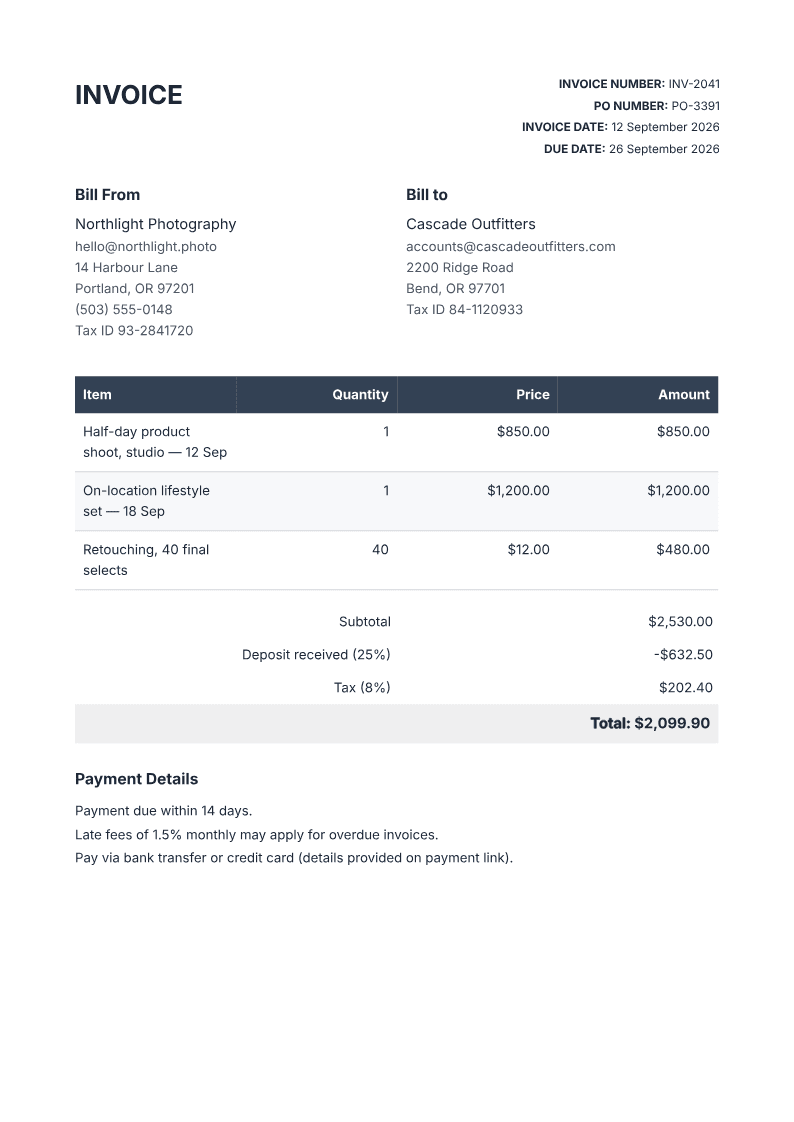
Download the invoice PDF or inspect the render verification record. We checked A4 dimensions and text extraction programmatically. You can inspect the table and spacing yourself; this file is not evidence about ChatGPT's output.
Frequently asked questions
Can ChatGPT make a PDF with tables and page numbers?
Yes, a tool-enabled workflow can use code to produce those features. Whether a particular attempt meets your requirements must be checked in its output.
Can I do it for free?
OpenAI documents data analysis on the Free tier, subject to tool limits. Check your current session rather than assuming a subscription is required. PaintPDF also has a free plan, with metered AI credits and unlimited exports.
Why did I get a broken download link?
The file-generation step may have failed, or a tool or download limit may apply. OpenAI recommends checking the tool configuration and retrying with a smaller output file. A broken link alone does not mean ChatGPT cannot generate PDFs.
When is PaintPDF worth trying?
When you want a dedicated A4 preview and an editable document in the same workspace as your chat. Try a relevant public example first, then use the studio for your own content.
Build an editable A4 document with a live preview, then download the PDF. Free to start, no watermark.
Open the AI PDF generator