Price list templates
Free Price List Template
List what you sell, set the rates, and download a price sheet you can print or email. Keep it as a template and update the prices when they change.
Fill and download without an account. Use AI chat in the studio when you need more.
- Real document blocks
- Tables and headings stay selectable and printable.
- Live A4 preview
- What you see is what the PDF prints.
- Edit by chatting
- Change anything with one sentence.
- Free download
- No watermark, unlimited exports.
What is PaintPDF's price list generator?
PaintPDF's price list template lays out your services and rates in a clean A4 table with item, description and price columns. Fill the form, download the PDF, and keep the layout for the next season's prices. Free, no watermark.
Get a free price list template: fill the form or pick an example in the live demo, then download the PDF or open it in the studio to make it yours. No sign-in to download, no watermark.
Two layouts: description and price, or three columns
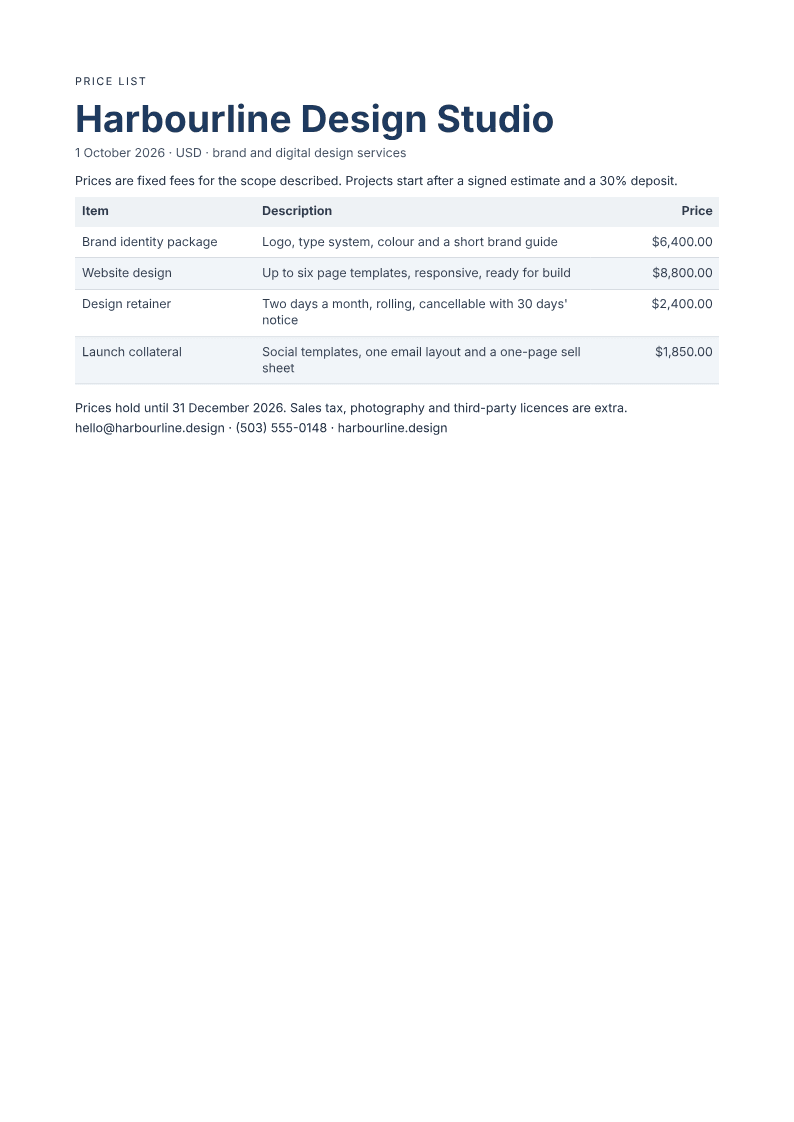
A short list needs only an item and a price. A longer list earns a third column for what is included, so a client can compare two packages without asking. This template uses the three-column layout: item, description and price. Delete the description column in your own copy when the names are self-explanatory.
Where they usually go wrong
It has to look like you do this for a living.
A Word file shows the seams: floating tables, mismatched type, spacing you fixed twice.
Template sites make you retype the job into their form.
Twelve fields before you see a page, and the result still looks like their template.
One change and the layout falls apart.
Move a line and the table, the headings, and the footer all need re-fixing.
- Item: the service or product name, in the words clients use
- Description: scope, quantity or what the price includes
- Price: the amount, in one currency, with the same number of decimals on every row
Item | Description | Price |
|---|---|---|
Brand identity package | Logo, type system, colour and a short brand guide | $6,400.00 |
Website design | Up to six page templates, responsive, ready for build | $8,800.00 |
Design retainer | Two days a month, rolling, cancellable with 30 days' notice | $2,400.00 |
Launch collateral | Social templates, one email layout and a one-page sell sheet | $1,850.00 |
How it works
Choose a template
Preview a ready-made layout and choose the one that fits your document.
Enter your details
Fill the template's fields and watch the PDF preview update. Required values are flagged and defined totals are calculated for you.
Download or customize
Download your PDF, or continue in the app to customize it in chat and save a reusable template. Your details come with you.
Free to start. No watermark.
Fill a price list template in your browser
Type your details into the form and the real A4 page updates as you type. Download it now, or open it in the studio and save it as a template you can refill next month. No upload, no design software.
Start from a fillable template
Opening your template…
You type it, it sets it
Every part of the document is something you can ask for in a sentence. This is a real edit, made on the example above.
One more row in the price table, with its own description and rate.
Item | Description | Price |
|---|---|---|
Brand identity package | Logo, type system, colour and a short brand guide | $6,400.00 |
Website design | Up to six page templates, responsive, ready for build | $8,800.00 |
Questions, answered
Keeping money columns readable
Money columns fail when the reader has to guess the currency or line up decimal points by eye. Put the currency on every row or in the column heading, right-align the figures, and use two decimals consistently. State whether tax is included, and put delivery or setup fees on their own line rather than hiding them in a package price.
Turn an accepted price into an invoiceQuote a specific jobSee all fillable templates
Is a price list the same as a quote?
No. A price list states your standard rates. A quote or estimate prices a defined job for one client, with a scope, a valid-until date and exclusions. Use the price list to show what you charge and the estimate when you are pricing a specific piece of work.
Can I update prices without rebuilding the page?
Yes. Open the saved price list, change the figures in the form and download a new PDF. The table, headings and notes stay in place, so a seasonal update takes minutes.
How should I format the prices?
Use one currency, right-align the figures and keep two decimals on every row. Say whether tax is included, and list delivery, setup or third-party costs separately rather than folding them into a package price.
Can I use it for products as well as services?
Yes. The item column holds a product name and the description column holds size, quantity or what is included. A bakery, a studio and a repair shop can use the same three columns.
Is the price list template free?
Yes. Fill the form and download the PDF without a watermark or an account. The free plan has unlimited exports, and saving the list in the studio uses the normal free allowance.
Price list, estimate or quote
A price list states what you charge. An estimate or a quote prices a specific job for a specific client, with a scope, a valid-until date and exclusions. Send the price list to browsers and the estimate to a buyer. Do not let a price list stand in for a quote when the work has a defined scope.
Keep a master and copy it
Keep one master price list with your current rates and duplicate it when a season or a client needs different prices. The layout stays, the values change, and the old list remains available for comparison. That is the reuse case this template is built for.
How long does it take to build the price list?
One short chat: describe what you need, check the live preview, download the PDF. You can keep changing it after that.
Can I bring a document I already have?
Yes. Attach up to four files at a time: images up to 5 MB, PDFs up to 10 MB, or text files up to 200 KB (.txt, .md, .csv, .json). For Word (.docx, not .doc), PDF, Markdown, HTML or LaTeX documents up to 10 MB each, choose ‘Import into this document’ from the studio’s attachment menu. The agent rebuilds imports as editable blocks; original formatting may change.
Put the prices on one clean page
- Item, description and price in aligned columns.
- Validity and tax notes where clients look.
- Free to start, no watermark.
No credit card.