- Real document blocks
- Tables and headings stay selectable and printable.
- Live A4 preview
- What you see is what the PDF prints.
- Edit by chatting
- Change anything with one sentence.
- Free download
- No watermark, unlimited exports.
Use blank fields or fictional data only; do not enter real patient information. PaintPDF is not a medical record system and makes no HIPAA-compliance or clinical-validation claim. Have qualified advisers review the form and consent wording before use.
Everything an intake form needs
A good intake form collects what the clinician needs before the visit, in the order the visit happens. The layout follows that order.
Where they usually go wrong
It has to look like you do this for a living.
A Word file shows the seams: floating tables, mismatched type, spacing you fixed twice.
Template sites make you retype the job into their form.
Twelve fields before you see a page, and the result still looks like their template.
One change and the layout falls apart.
Move a line and the table, the headings, and the footer all need re-fixing.
- Patient and emergency-contact details
- Medical history and current medications as tables
- Allergies called out where they cannot be missed
- A consent paragraph and a signature line
| Condition | Year | Notes |
|---|---|---|
| Mild asthma | 2012 | Managed with an inhaler as needed |
| Wisdom teeth removed | 2016 | All four, no complications |
Adapt it to your practice
The same skeleton fits most intake workflows; the tables and notes change:
Dental practices
History, medications, and consent to treat
Physiotherapy
Injury history and current medications
GP and specialist clinics
Allergies and emergency contact first
Wellness and allied health
A shorter form with the same consent block
How it works
Describe it
Type what you need in plain language: the client, the line items, the tone. Attach a file if you have one.
Refine by chatting
The agent builds the document with real tables and headings, and you change anything just by asking. A live A4 preview updates as it works.
Download the PDF
Export a print-ready A4 PDF. No watermark on the free plan, and unlimited exports.
Free to start. No watermark.
See a finished intake form
Pick an example and the full PDF renders here in seconds. Download it if you like it, no sign-in needed.
New-patient intake form for a dental practice
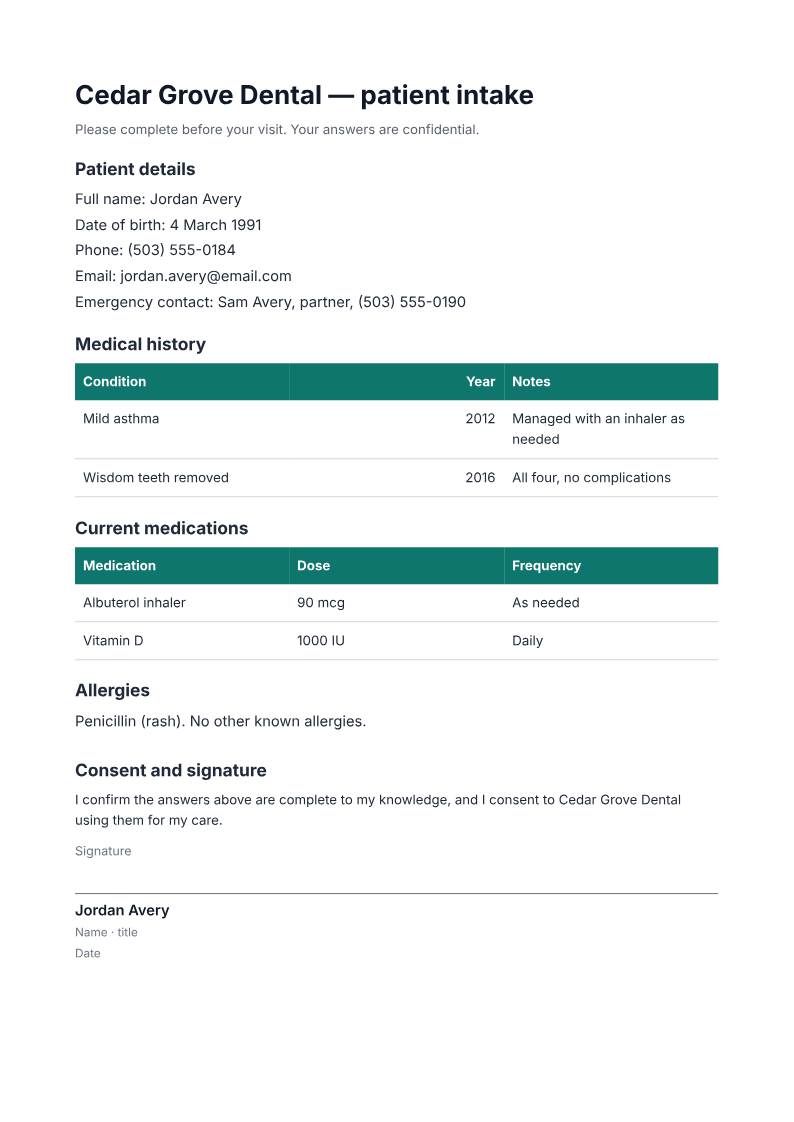
Like it? Open a copy in the studio and change anything by chatting. Free, no watermark.
Make my intake formYou type it, it sets it
Every part of the document is something you can ask for in a sentence. This is a real edit, made on the example above.
One more row in the medical-history table, with year and notes.
| Condition | Year | Notes |
|---|---|---|
| Mild asthma | 2012 | Managed with an inhaler as needed |
| Wisdom teeth removed | 2016 | All four, no complications |
Questions, answered
Where does the filled-in data go?
Ask for blank fields and print the reviewed form for completion outside PaintPDF. Public examples use fictional data. Studio documents and chat are saved to your account, so do not enter or upload real patient information; use your practice's approved records process for completed forms.
Is this a medical record system?
No. It generates a printable form. Filled-in forms are handled by your practice's own records process; nothing is stored by PaintPDF beyond the document you create.
Can I change the questions?
Yes. Ask the agent to add, remove, or reword any field, and it edits the form in place. For a different specialty, the tables and consent line adapt.
Is it HIPAA-compliant?
PaintPDF makes no HIPAA-compliance claim. Use blank fields or fictional data only, and do not upload real patient information. Have your compliance and clinical advisers review the form and your handling process before adopting it.
Is it free?
Free to start, no watermark, unlimited exports, around 20 PDFs a month on the free plan.
How long does it take to build the intake form?
One short chat: describe what you need, check the live preview, download the PDF. You can keep changing it after that.
Can I bring a document I already have?
Yes. Attach up to four files at a time: images up to 5 MB, PDFs up to 10 MB, or text files up to 200 KB (.txt, .md, .csv, .json). For Word (.docx, not .doc), PDF, Markdown, HTML or LaTeX documents up to 10 MB each, choose ‘Import a document’ from the studio’s attachment menu. The agent rebuilds imports as editable blocks; original formatting may change.
A form that is ready before the visit
- Patient, history, and medication details.
- Allergies and consent where they belong.
- Free to start, no watermark.
No credit card.