- Real document blocks
- Tables and headings stay selectable and printable.
- Live A4 preview
- What you see is what the PDF prints.
- Edit by chatting
- Change anything with one sentence.
- Free download
- No watermark, unlimited exports.
Everything a label needs to route
A label is read by machines and by people, so the layout puts the addressing where both expect it.
Where they usually go wrong
It has to look like you do this for a living.
A Word file shows the seams: floating tables, mismatched type, spacing you fixed twice.
Template sites make you retype the job into their form.
Twelve fields before you see a page, and the result still looks like their template.
One change and the layout falls apart.
Move a line and the table, the headings, and the footer all need re-fixing.
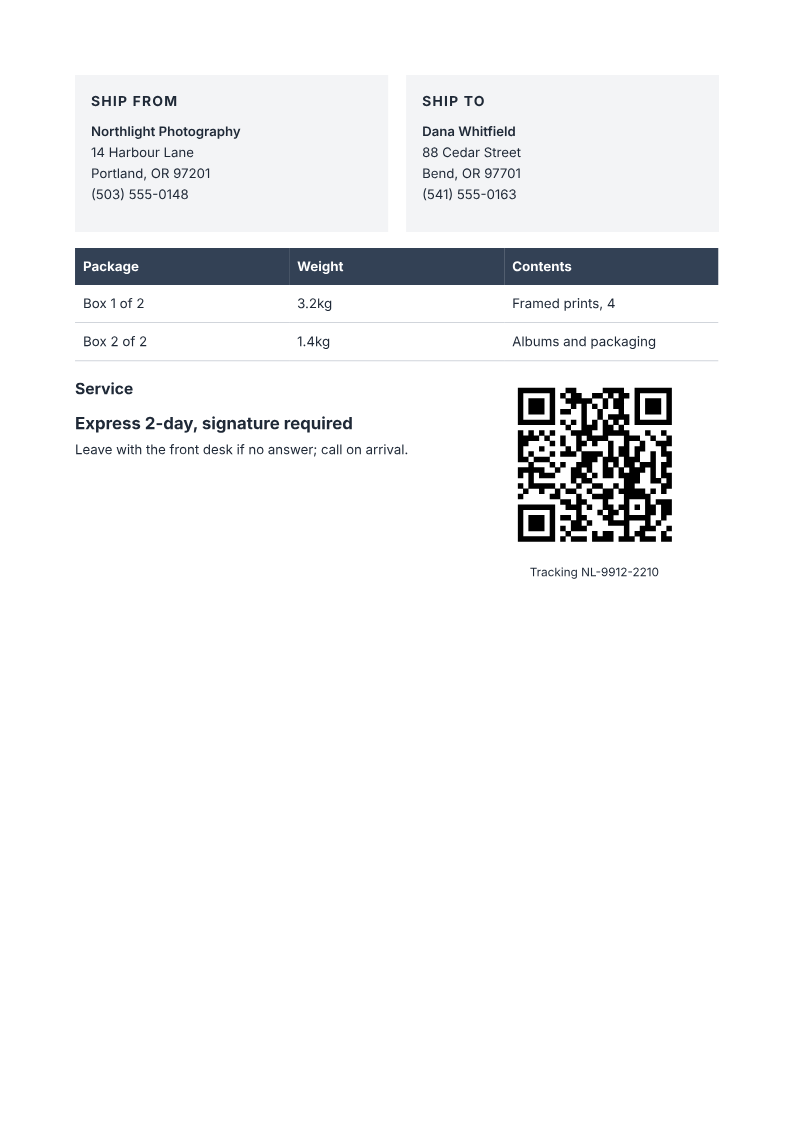
- Ship-from and ship-to blocks with names, addresses, and phones
- A parcels table with per-box weight and contents
- The service level, large enough to read at arm's length
- A tracking QR and number
| Package | Weight | Contents |
|---|---|---|
| Box 1 of 2 | 3.2kg | Framed prints, 4 |
| Box 2 of 2 | 1.4kg | Albums and packaging |
When to use it
Carrier portals cover most shipments; a generated label helps when the shipment is yours to define:
Multi-box shipments that need one label per box
Local or courier deliveries your carrier portal does not handle
Warehouse-to-store transfers with internal tracking codes
Returns labels for a small operation without a carrier integration
How it works
Describe it
Type what you need in plain language: the client, the line items, the tone. Attach a file if you have one.
Refine by chatting
The agent builds the document with real tables and headings, and you change anything just by asking. A live A4 preview updates as it works.
Download the PDF
Export a print-ready A4 PDF. No watermark on the free plan, and unlimited exports.
Free to start. No watermark.
See a finished shipping label
Pick an example and the full PDF renders here in seconds. Download it if you like it, no sign-in needed.
Two-box shipping label, express 2-day, tracking QR
Like it? Open a copy in the studio and change anything by chatting. Free, no watermark.
Make my labelYou type it, it sets it
Every part of the document is something you can ask for in a sentence. This is a real edit, made on the example above.
One more row in the parcels table, with its weight and contents.
| Package | Weight | Contents |
|---|---|---|
| Box 1 of 2 | 3.2kg | Framed prints, 4 |
| Box 2 of 2 | 1.4kg | Albums and packaging |
Questions, answered
When would I use this instead of my carrier's label?
Use this for an address label or internal parcel reference. Obtain required postage, barcodes, customs documents and carrier-approved shipping labels from your carrier. A PaintPDF label does not replace them or guarantee carrier acceptance.
Does it buy postage?
No. It produces the printable label; postage, customs, and the carrier booking happen in your carrier's system or platform.
Can I print several boxes on one label?
The parcels table lists every box with its weight and contents, and the tracking number is shared. For carrier-required per-box labels, generate one document per box.
Does the QR code track the parcel?
The QR encodes the value you supply. A valid URL can open a tracking page; an internal code or number does not automatically become a working carrier link. This is not a prepaid or carrier-certified postage label.
Is it free?
Free to start, no watermark, unlimited exports, around 20 PDFs a month on the free plan.
How long does it take to build the shipping label?
One short chat: describe what you need, check the live preview, download the PDF. You can keep changing it after that.
Can I bring a document I already have?
Yes. Attach up to four files at a time: images up to 5 MB, PDFs up to 10 MB, or text files up to 200 KB (.txt, .md, .csv, .json). For Word (.docx, not .doc), PDF, Markdown, HTML or LaTeX documents up to 10 MB each, choose ‘Import a document’ from the studio’s attachment menu. The agent rebuilds imports as editable blocks; original formatting may change.
A label that routes the first time
- Addresses, weights, and service level in place.
- A tracking QR anyone can scan.
- Free to start, no watermark.
No credit card.